
This is best Fabric, Power BI, SQL and AI community event. How do we know? The last event sold out! Save €200 with code FABCMTY200.
Register nowJuly 28 - August 9 | Final Round of the Power BI Dataviz World Championships. This is your chance. Learn more
The current query I have is made up of merging multiple tables with some column calculations as well.
Everything works perfectly but their is no structure to the heirarchy.
For example, I have [Year] [Quarter] [Month]
When I put these into a pivot table as columns and only show columns with data, it works fine.
However, if I want each [Month] to show, even if the data is empty, it shows Jan through Dec four times under [Quater], making 48 columns.
How can I create a heirachy so that only certain month sow under certain quarters, and then weeks under months, etc. ?
Solved! Go to Solution.
Hi @Anonymous ,
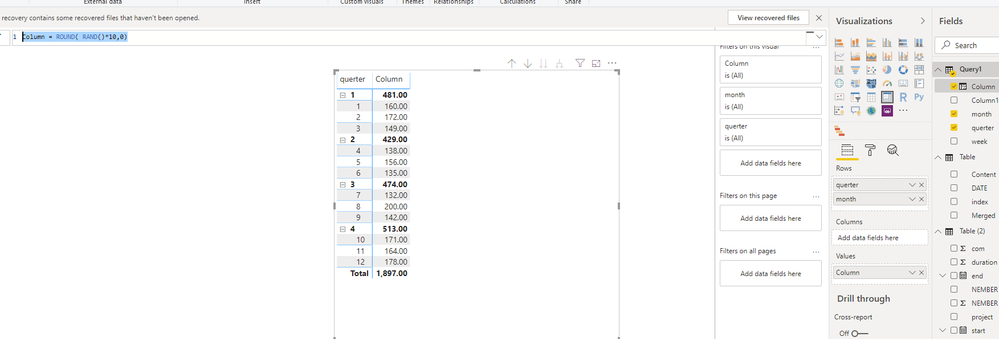
I think you could create data structure like below, then use this in Matrix
let
Source = List.Dates(#date(2020,1,1),365,#duration(1,0,0,0)),
#"Converted to Table" = Table.FromList(Source, Splitter.SplitByNothing(), null, null, ExtraValues.Error),
#"Added Custom" = Table.AddColumn(#"Converted to Table", "querter", each Date.QuarterOfYear([Column1])),
#"Added Custom1" = Table.AddColumn(#"Added Custom", "month", each Date.Month([Column1])),
#"Added Custom2" = Table.AddColumn(#"Added Custom1", "week", each Date.WeekOfMonth([Column1]))
in
#"Added Custom2"Column = ROUND( RAND()*10,0)
Best Regards,
Zoe Zhi
If this post helps, then please consider Accept it as the solution to help the other members find it more quickly.
Hi @Anonymous ,
I think you could create data structure like below, then use this in Matrix
let
Source = List.Dates(#date(2020,1,1),365,#duration(1,0,0,0)),
#"Converted to Table" = Table.FromList(Source, Splitter.SplitByNothing(), null, null, ExtraValues.Error),
#"Added Custom" = Table.AddColumn(#"Converted to Table", "querter", each Date.QuarterOfYear([Column1])),
#"Added Custom1" = Table.AddColumn(#"Added Custom", "month", each Date.Month([Column1])),
#"Added Custom2" = Table.AddColumn(#"Added Custom1", "week", each Date.WeekOfMonth([Column1]))
in
#"Added Custom2"Column = ROUND( RAND()*10,0)
Best Regards,
Zoe Zhi
If this post helps, then please consider Accept it as the solution to help the other members find it more quickly.
Join us in Barcelona for FabCon and SQLCon, the Fabric, Power BI, SQL, and AI community event. Save €200 with code FABCMTY200.
If you love stickers, then you will definitely want to check out our community sticker challenge, Barcelona edition!
Check out the July 2026 Power BI update to learn about new features.
| User | Count |
|---|---|
| 3 | |
| 2 | |
| 2 | |
| 1 | |
| 1 |