
Don't miss your chance to take the Fabric Data Engineer (DP-600) exam for FREE! Find out how by watching the DP-600 session on-demand now through April 28th.
Learn moreJoin the FabCon + SQLCon recap series. Up next: Power BI, Real-Time Intelligence, IQ and AI, and Data Factory take center stage. All sessions are available on-demand after the live show. Register now
The current query I have is made up of merging multiple tables with some column calculations as well.
Everything works perfectly but their is no structure to the heirarchy.
For example, I have [Year] [Quarter] [Month]
When I put these into a pivot table as columns and only show columns with data, it works fine.
However, if I want each [Month] to show, even if the data is empty, it shows Jan through Dec four times under [Quater], making 48 columns.
How can I create a heirachy so that only certain month sow under certain quarters, and then weeks under months, etc. ?
Solved! Go to Solution.
Hi @Anonymous ,
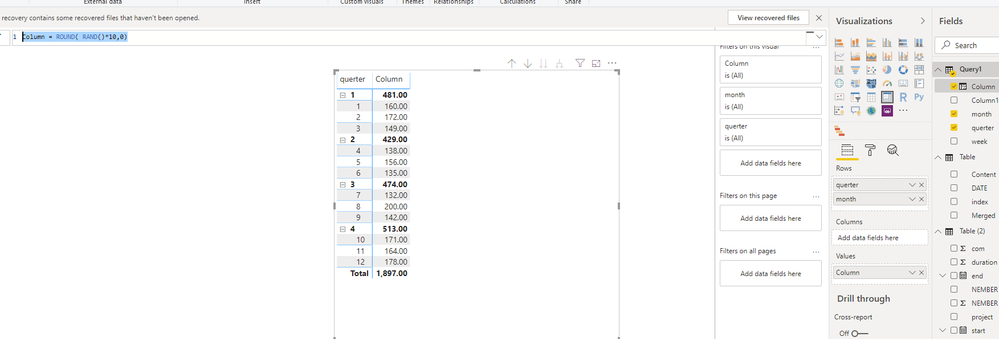
I think you could create data structure like below, then use this in Matrix
let
Source = List.Dates(#date(2020,1,1),365,#duration(1,0,0,0)),
#"Converted to Table" = Table.FromList(Source, Splitter.SplitByNothing(), null, null, ExtraValues.Error),
#"Added Custom" = Table.AddColumn(#"Converted to Table", "querter", each Date.QuarterOfYear([Column1])),
#"Added Custom1" = Table.AddColumn(#"Added Custom", "month", each Date.Month([Column1])),
#"Added Custom2" = Table.AddColumn(#"Added Custom1", "week", each Date.WeekOfMonth([Column1]))
in
#"Added Custom2"Column = ROUND( RAND()*10,0)
Best Regards,
Zoe Zhi
If this post helps, then please consider Accept it as the solution to help the other members find it more quickly.
Hi @Anonymous ,
I think you could create data structure like below, then use this in Matrix
let
Source = List.Dates(#date(2020,1,1),365,#duration(1,0,0,0)),
#"Converted to Table" = Table.FromList(Source, Splitter.SplitByNothing(), null, null, ExtraValues.Error),
#"Added Custom" = Table.AddColumn(#"Converted to Table", "querter", each Date.QuarterOfYear([Column1])),
#"Added Custom1" = Table.AddColumn(#"Added Custom", "month", each Date.Month([Column1])),
#"Added Custom2" = Table.AddColumn(#"Added Custom1", "week", each Date.WeekOfMonth([Column1]))
in
#"Added Custom2"Column = ROUND( RAND()*10,0)
Best Regards,
Zoe Zhi
If this post helps, then please consider Accept it as the solution to help the other members find it more quickly.
Check out the April 2026 Power BI update to learn about new features.
If you have recently started exploring Fabric, we'd love to hear how it's going. Your feedback can help with product improvements.
A new Power BI DataViz World Championship is coming this June! Don't miss out on submitting your entry.
| User | Count |
|---|---|
| 8 | |
| 6 | |
| 5 | |
| 5 | |
| 4 |