Join us at FabCon Atlanta from March 16 - 20, 2026, for the ultimate Fabric, Power BI, AI and SQL community-led event. Save $200 with code FABCOMM.
Register now!The Power BI Data Visualization World Championships is back! Get ahead of the game and start preparing now! Learn more
Hi All,
I am trying to connect to MS Access with gateway. I want to know what should be connection string for connecting MS access from my computer.
Right now i am below String -
Driver={Microsoft Access Driver (*.mdb, *.accdb)};DBQ=C:\Users\Access database.accdb
This is trowing error -
| Activity ID: | 56145451-b8f3-4f95-a645-09b8c4dc3f85 |
| Request ID: | 5be062d2-4e8d-78b4-225f-b1b5b1eb0fea |
| Cluster URI: | https://wabi-us-east2-redirect.analysis.windows.net |
| Status code: | 400 |
| Error Code: | DM_GWPipeline_Gateway_MashupDataAccessError |
| Time: | Fri Mar 31 2017 10:50:31 GMT-0400 (Eastern Standard Time) |
| Version: | 13.0.1700.1649 |
Any Idea?
Thanks in advance.
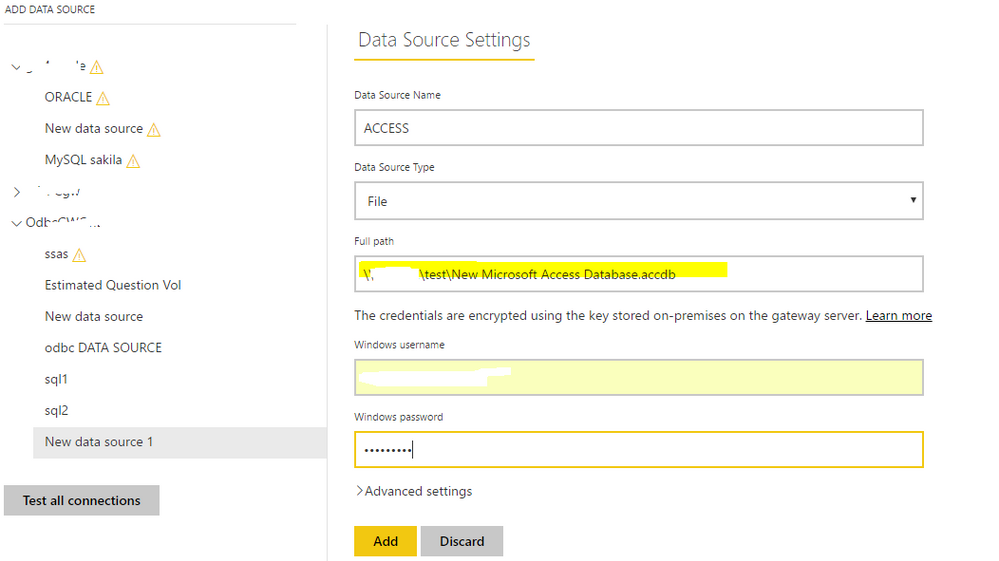
Supposing you're talking about configuring a data source for Access DB in the "manage gateways" option in Power BI Service, as Access DB is a file and when creating a datasource, choose "File" as "Data Source Type" and type the "full path" with the actual file path.
@Eric_Zhangthanks for your reply but that did not work. It is throwing error " Details: "Invalid connection credentials."Hide details"
The Power BI Data Visualization World Championships is back! Get ahead of the game and start preparing now!
| User | Count |
|---|---|
| 19 | |
| 9 | |
| 8 | |
| 7 | |
| 6 |