Get certified for free when you join Fabric Data Days 2026 and dive into Fabric, Power BI, SQL, AI, and other essential data skills.
Join nowJuly 28 - August 9 | Final Round of the Power BI Dataviz World Championships. This is your chance. Learn more
Hi All,
I am trying to connect to MS Access with gateway. I want to know what should be connection string for connecting MS access from my computer.
Right now i am below String -
Driver={Microsoft Access Driver (*.mdb, *.accdb)};DBQ=C:\Users\Access database.accdb
This is trowing error -
| Activity ID: | 56145451-b8f3-4f95-a645-09b8c4dc3f85 |
| Request ID: | 5be062d2-4e8d-78b4-225f-b1b5b1eb0fea |
| Cluster URI: | https://wabi-us-east2-redirect.analysis.windows.net |
| Status code: | 400 |
| Error Code: | DM_GWPipeline_Gateway_MashupDataAccessError |
| Time: | Fri Mar 31 2017 10:50:31 GMT-0400 (Eastern Standard Time) |
| Version: | 13.0.1700.1649 |
Any Idea?
Thanks in advance.
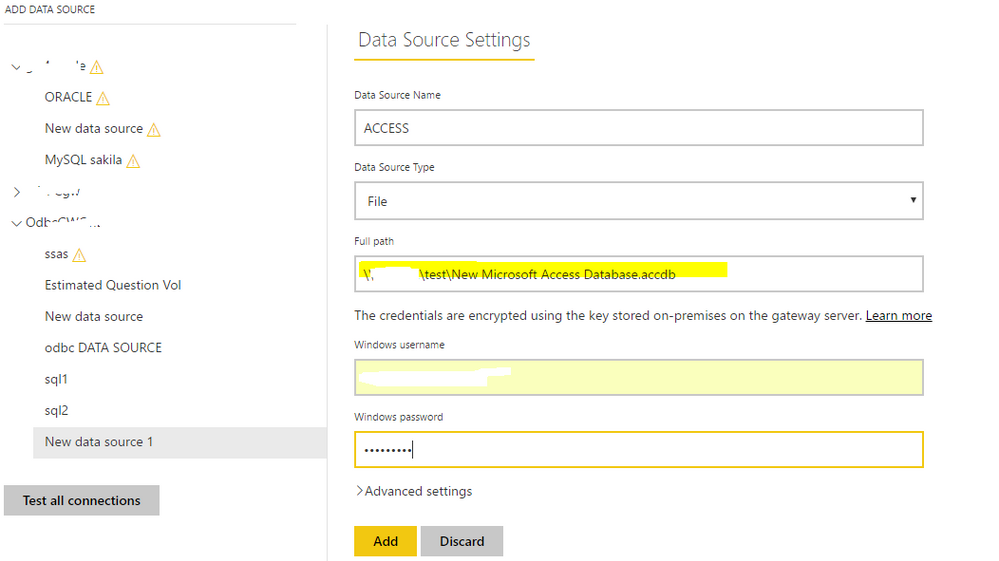
Supposing you're talking about configuring a data source for Access DB in the "manage gateways" option in Power BI Service, as Access DB is a file and when creating a datasource, choose "File" as "Data Source Type" and type the "full path" with the actual file path.
@Eric_Zhangthanks for your reply but that did not work. It is throwing error " Details: "Invalid connection credentials."Hide details"
If you love stickers, then you will definitely want to check out our community sticker challenge, Barcelona edition!
Check out the July 2026 Power BI update to learn about new features.
| User | Count |
|---|---|
| 4 | |
| 2 | |
| 2 | |
| 2 | |
| 1 |