Join us at FabCon Atlanta from March 16 - 20, 2026, for the ultimate Fabric, Power BI, AI and SQL community-led event. Save $200 with code FABCOMM.
Register now!Learn from the best! Meet the four finalists headed to the FINALS of the Power BI Dataviz World Championships! Register now
Hi All,
I am trying to connect to MS Access with gateway. I want to know what should be connection string for connecting MS access from my computer.
Right now i am below String -
Driver={Microsoft Access Driver (*.mdb, *.accdb)};DBQ=C:\Users\Access database.accdb
This is trowing error -
| Activity ID: | 56145451-b8f3-4f95-a645-09b8c4dc3f85 |
| Request ID: | 5be062d2-4e8d-78b4-225f-b1b5b1eb0fea |
| Cluster URI: | https://wabi-us-east2-redirect.analysis.windows.net |
| Status code: | 400 |
| Error Code: | DM_GWPipeline_Gateway_MashupDataAccessError |
| Time: | Fri Mar 31 2017 10:50:31 GMT-0400 (Eastern Standard Time) |
| Version: | 13.0.1700.1649 |
Any Idea?
Thanks in advance.
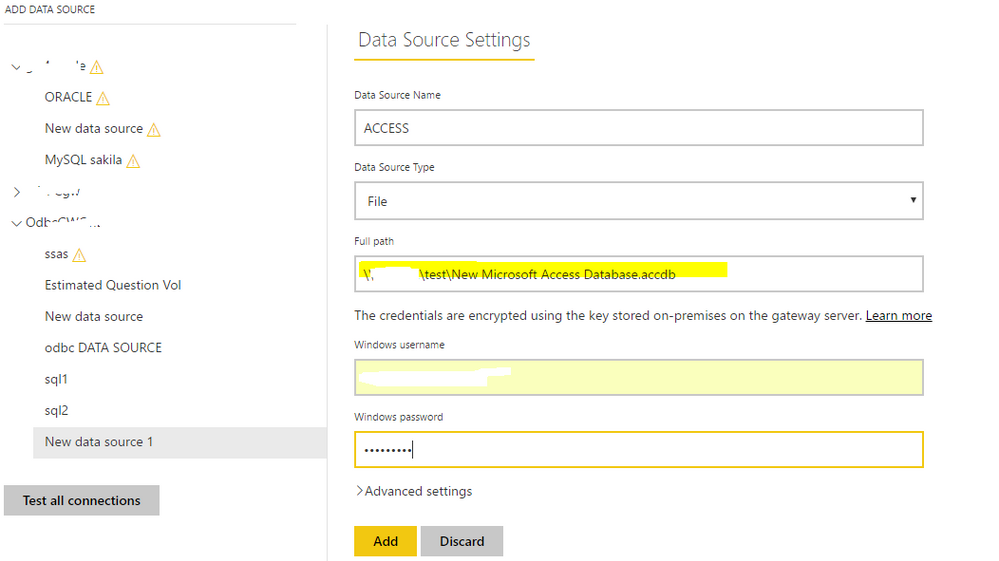
Supposing you're talking about configuring a data source for Access DB in the "manage gateways" option in Power BI Service, as Access DB is a file and when creating a datasource, choose "File" as "Data Source Type" and type the "full path" with the actual file path.
@Eric_Zhangthanks for your reply but that did not work. It is throwing error " Details: "Invalid connection credentials."Hide details"
Share feedback directly with Fabric product managers, participate in targeted research studies and influence the Fabric roadmap.
Check out the February 2026 Power BI update to learn about new features.
| User | Count |
|---|---|
| 16 | |
| 12 | |
| 10 | |
| 7 | |
| 6 |