cancel
Showing results for 
Search instead for 
Did you mean: 

Learn from the best! Meet the four finalists headed to the FINALS of the Power BI Dataviz World Championships! Register now

Reply
dstramilov
Helper II
Helper II

Connect 2 Tables Using Time Between

Hello,


Got 2 tables:

Table 1


Health Plan Name | Health Plan Start Date | Health Plan End Date | Health Plan Cost Per Month

Plan A                    | 1/1/2014                      | 12/31/2014                | 400

Plan A                    | 1/1/2015                      | 12/31/2015                | 500

Plan A                    | 1/1/2016                      | 12/31/2016                | 600


Table 2


Employee ID | Health Plan Name  | Health Plan Select Start Date | Health Plan Select End Date

12345           |  Plan A                    | 5/1/2014                                 | 2/31/2015

12346           |  Plan A                    | 4/1/2016                                 |12/31/2078

12347           |  Plan A                    | 7/1/2015                                 |12/31/2078


I need to connect these tables so I can run report & find out how much each employee should pay for any give period.


1 ACCEPTED SOLUTION
Anonymous
Not applicable

Hi @dstramilov,


Based on your description, you want to get the summary pay of the employee, right?


If as I said, you can refer to below formula:


Total = 
var currStart=MAX(Sheet2[Health Plan Select Start Date])
var currEnd=MAX(Sheet2[Health Plan Select End Date])
var startRange=12-MONTH(currStart)+1
var endRange=MONTH(currEnd)
var startPerMonth= LOOKUPVALUE(Sheet1[Health Plan Cost Per Month],Sheet1[Health Paln Start Date].[Year],YEAR(currStart))
var EndPerMonth= LOOKUPVALUE(Sheet1[Health Plan Cost Per Month],Sheet1[Health Plan End Date].[Year],YEAR(currEnd))
return 
if(AND([Middle Date Start]<>BLANK(),[Middle Date End]<>BLANK()),SUMX(FILTER(ALL(Sheet1),AND(Sheet1[Health Paln Start Date]>=[Middle Date Start],Sheet1[Health Plan End Date]<=[Middle Date End])),Sheet1[Health Plan Cost Per Month]*12),0)+

startRange*startPerMonth+endRange*EndPerMonth


Tables:
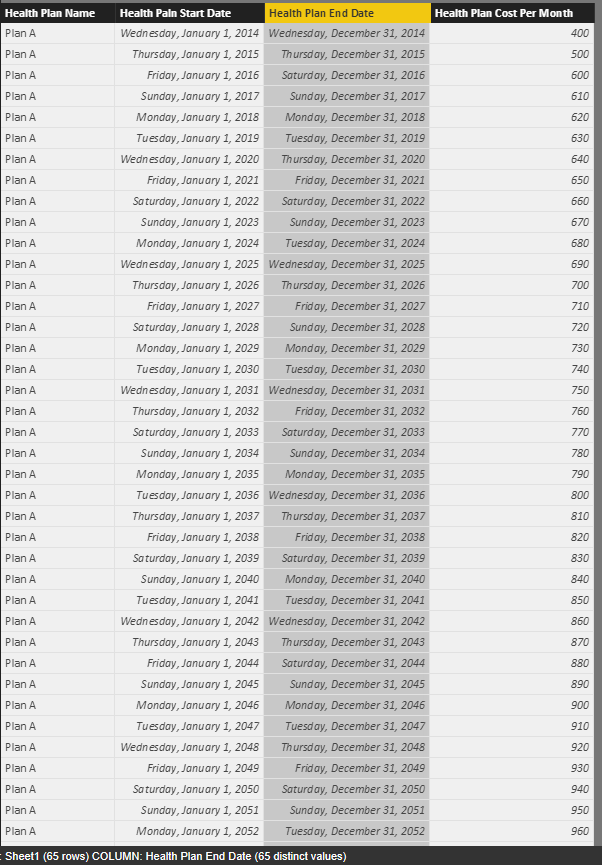
 Capture.PNGCapture2.PNG


Measure to get the middle start date and end date:


Middle Date Start =
var currStart=MAX([Health Plan Select Start Date])
var currEnd= MAX([Health Plan Select End Date])
return
if(DATEDIFF(currStart,currEnd,DAY)>=365, DATE(YEAR( currStart)+1,1,1),BLANK())


Middle Date End =
var currStart = MAX([Health Plan Select Start Date])
var currEnd = MAX([Health Plan Select End Date])
return
if(DATEDIFF(currStart,currEnd,DAY)>=365, DATE(YEAR( currEnd)-1,12,31),BLANK())


Create visual to display the result:


Capture3.PNG 


Notice: I spilt the date range based on three points: start part , middle part, end part.(start date to 12.31, the full years range, 1.1 to end date)


Regards,
Xiaoxin Sheng

View solution in original post

4 REPLIES 4
ImkeF
Community Champion
Community Champion

Another option would be to add a column in the query editor, that would create one line for each month in both tables. You could then connect these tables by the date (either directly or via a calendar-table):


This formula in an added-custom columnn would create a list on you first table with all months-end-dates within the range:


List.Distinct(List.Transform({Number.From([Health Plan Start Date])..Number.From([Health Plan End Date])}, each Date.EndOfMonth(Date.From(_))))


Simply replace the bolded expressions by the column names of your 2nd table.


You then just have to expand this column and all the rows will be created automatically. Just load to the data model then.


It will drag on the performance, but seems a bit quicker to implement.


Imke Feldmann (The BIccountant)

If you liked my solution, please give it a thumbs up. And if I did answer your question, please mark this post as a solution. Thanks!

How to integrate M-code into your solution -- How to get your questions answered quickly -- How to provide sample data -- Check out more PBI- learning resources here -- Performance Tipps for M-queries

Anonymous
Not applicable

Hi @dstramilov,


Based on your description, you want to get the summary pay of the employee, right?


If as I said, you can refer to below formula:


Total = 
var currStart=MAX(Sheet2[Health Plan Select Start Date])
var currEnd=MAX(Sheet2[Health Plan Select End Date])
var startRange=12-MONTH(currStart)+1
var endRange=MONTH(currEnd)
var startPerMonth= LOOKUPVALUE(Sheet1[Health Plan Cost Per Month],Sheet1[Health Paln Start Date].[Year],YEAR(currStart))
var EndPerMonth= LOOKUPVALUE(Sheet1[Health Plan Cost Per Month],Sheet1[Health Plan End Date].[Year],YEAR(currEnd))
return 
if(AND([Middle Date Start]<>BLANK(),[Middle Date End]<>BLANK()),SUMX(FILTER(ALL(Sheet1),AND(Sheet1[Health Paln Start Date]>=[Middle Date Start],Sheet1[Health Plan End Date]<=[Middle Date End])),Sheet1[Health Plan Cost Per Month]*12),0)+

startRange*startPerMonth+endRange*EndPerMonth


Tables:

 Capture.PNGCapture2.PNG


Measure to get the middle start date and end date:


Middle Date Start =
var currStart=MAX([Health Plan Select Start Date])
var currEnd= MAX([Health Plan Select End Date])
return
if(DATEDIFF(currStart,currEnd,DAY)>=365, DATE(YEAR( currStart)+1,1,1),BLANK())


Middle Date End =
var currStart = MAX([Health Plan Select Start Date])
var currEnd = MAX([Health Plan Select End Date])
return
if(DATEDIFF(currStart,currEnd,DAY)>=365, DATE(YEAR( currEnd)-1,12,31),BLANK())


Create visual to display the result:
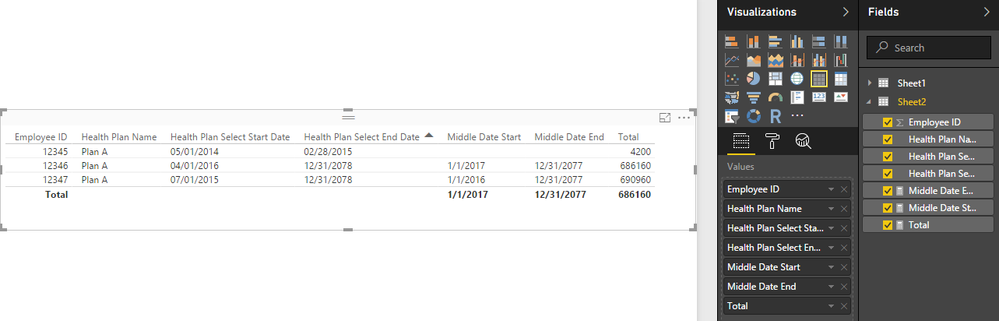

Capture3.PNG 


Notice: I spilt the date range based on three points: start part , middle part, end part.(start date to 12.31, the full years range, 1.1 to end date)


Regards,
Xiaoxin Sheng

I think you are getting very close, I am getting this error:


"A table of multiple values was supplied where a single value was expected."


Could you send me actual .pbix file please.


Anonymous
Not applicable

Hi @dstramilov,


If below file is not help, plese feel free to let me know.


Regards,

Xiaoxin Sheng

Helpful resources

Announcements
Power BI DataViz World Championships carousel

Power BI DataViz World Championships - June 2026

A new Power BI DataViz World Championship is coming this June! Don't miss out on submitting your entry.

Join our Fabric User Panel

Join our Fabric User Panel

Share feedback directly with Fabric product managers, participate in targeted research studies and influence the Fabric roadmap.

March Power BI Update Carousel

Power BI Community Update - March 2026

Check out the March 2026 Power BI update to learn about new features.