cancel
Showing results for 
Search instead for 
Did you mean: 

The Power BI Data Visualization World Championships is back! Get ahead of the game and start preparing now! Learn more

Reply
Anonymous
Not applicable

Conditional column between 2 dates

Hello. I am trying to calculate a conditional column which returns a name if a date is between 2 dates. 


My data looks like this in one column: 


Date
2020-05-27
2020-05-28
2020-05-29
2020-05-30
2020-05-31
2020-06-01
2020-06-02
2020-06-03
2020-06-04
2020-06-05
2020-06-06
2020-06-07
2020-06-08
2020-06-09
2020-06-10


I would like to be able to add a name 'week X' for dates between a certain period. Like this: 

DateWeek
2020-05-27Week 1
2020-05-28Week 1
2020-05-29Week 1
2020-05-30Week 1
2020-05-31Week 1
2020-06-01Week 1
2020-06-02Week 1
2020-06-03Week 2
2020-06-04Week 2
2020-06-05Week 2
2020-06-06Week 2
2020-06-07Week 2
2020-06-08Week 2
2020-06-09Week 2
2020-06-10Week 3


Thanks

1 ACCEPTED SOLUTION
Anonymous
Not applicable


Actually, this will work nicer. Just go to add custom column then copy in this. 


Date.WeekOfYear(Date.AddWeeks([Date],-21),Day.Wednesday)

You can also download the test PBIX doc I created to see how I've achieved it. 


https://1drv.ms/u/s!AnIEh6WhI4JogrAPf3w8FrS2QvihAQ?e=GmWNsC


View solution in original post

5 REPLIES 5
Anonymous
Not applicable


Actually, this will work nicer. Just go to add custom column then copy in this. 


Date.WeekOfYear(Date.AddWeeks([Date],-21),Day.Wednesday)

You can also download the test PBIX doc I created to see how I've achieved it. 


https://1drv.ms/u/s!AnIEh6WhI4JogrAPf3w8FrS2QvihAQ?e=GmWNsC


Anonymous
Not applicable

Hi Karlos. This has kind of worked, but for any date before the 28th May (when the programme started) its showing incorrect weeks. Is there a way so it will show null for anything before the start date?


Thanks

Anonymous
Not applicable

@Anonymous here you go. I've also updated the one drive file. 


= Table.AddColumn(#"Changed Type1", "Custom.2", each if [Date] > #date(2020,5,27) then Date.WeekOfYear(Date.AddWeeks([Date],-21),Day.Wednesday) else null)


if [Date] > #date(2020,5,27) then Date.WeekOfYear(Date.AddWeeks([Date],-21),Day.Wednesday) else null


  If this solution works for you, please mark it as accepted and hit that thumbs up. 

Anonymous
Not applicable

Worked perfectly. Thank you. 

Anonymous
Not applicable

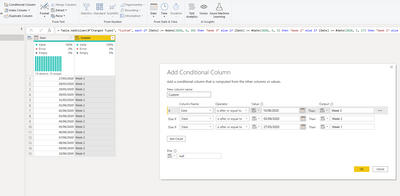
Add conditional Column, 

Karlos_0-1596098419295.png


= Table.AddColumn(#"Changed Type1", "Custom", 
each if [Date] >= #date(2020, 6, 10) then "Week 3" 
else if [Date] >= #date(2020, 6, 3) then "Week 2" 
else if [Date] >= #date(2020, 5, 27) then "Week 1" 
else null)


Helpful resources

Announcements
Power BI DataViz World Championships

Power BI Dataviz World Championships

The Power BI Data Visualization World Championships is back! Get ahead of the game and start preparing now!

December 2025 Power BI Update Carousel

Power BI Monthly Update - December 2025

Check out the December 2025 Power BI Holiday Recap!

FabCon Atlanta 2026 carousel

FabCon Atlanta 2026

Join us at FabCon Atlanta, March 16-20, for the ultimate Fabric, Power BI, AI and SQL community-led event. Save $200 with code FABCOMM.

Top Solution Authors