cancel
Showing results for 
Search instead for 
Did you mean: 

Learn from the best! Meet the four finalists headed to the FINALS of the Power BI Dataviz World Championships! Register now

Reply
Anonymous
Not applicable

Conditional column between 2 dates

Hello. I am trying to calculate a conditional column which returns a name if a date is between 2 dates. 


My data looks like this in one column: 


Date
2020-05-27
2020-05-28
2020-05-29
2020-05-30
2020-05-31
2020-06-01
2020-06-02
2020-06-03
2020-06-04
2020-06-05
2020-06-06
2020-06-07
2020-06-08
2020-06-09
2020-06-10


I would like to be able to add a name 'week X' for dates between a certain period. Like this: 

DateWeek
2020-05-27Week 1
2020-05-28Week 1
2020-05-29Week 1
2020-05-30Week 1
2020-05-31Week 1
2020-06-01Week 1
2020-06-02Week 1
2020-06-03Week 2
2020-06-04Week 2
2020-06-05Week 2
2020-06-06Week 2
2020-06-07Week 2
2020-06-08Week 2
2020-06-09Week 2
2020-06-10Week 3


Thanks

1 ACCEPTED SOLUTION
Anonymous
Not applicable


Actually, this will work nicer. Just go to add custom column then copy in this. 


Date.WeekOfYear(Date.AddWeeks([Date],-21),Day.Wednesday)

You can also download the test PBIX doc I created to see how I've achieved it. 


https://1drv.ms/u/s!AnIEh6WhI4JogrAPf3w8FrS2QvihAQ?e=GmWNsC


View solution in original post

5 REPLIES 5
Anonymous
Not applicable


Actually, this will work nicer. Just go to add custom column then copy in this. 


Date.WeekOfYear(Date.AddWeeks([Date],-21),Day.Wednesday)

You can also download the test PBIX doc I created to see how I've achieved it. 


https://1drv.ms/u/s!AnIEh6WhI4JogrAPf3w8FrS2QvihAQ?e=GmWNsC


Anonymous
Not applicable

Hi Karlos. This has kind of worked, but for any date before the 28th May (when the programme started) its showing incorrect weeks. Is there a way so it will show null for anything before the start date?


Thanks

Anonymous
Not applicable

@Anonymous here you go. I've also updated the one drive file. 


= Table.AddColumn(#"Changed Type1", "Custom.2", each if [Date] > #date(2020,5,27) then Date.WeekOfYear(Date.AddWeeks([Date],-21),Day.Wednesday) else null)


if [Date] > #date(2020,5,27) then Date.WeekOfYear(Date.AddWeeks([Date],-21),Day.Wednesday) else null


  If this solution works for you, please mark it as accepted and hit that thumbs up. 

Anonymous
Not applicable

Worked perfectly. Thank you. 

Anonymous
Not applicable

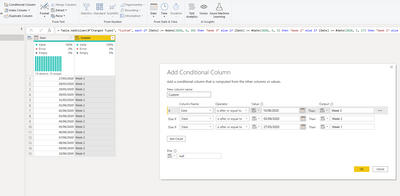
Add conditional Column, 

Karlos_0-1596098419295.png


= Table.AddColumn(#"Changed Type1", "Custom", 
each if [Date] >= #date(2020, 6, 10) then "Week 3" 
else if [Date] >= #date(2020, 6, 3) then "Week 2" 
else if [Date] >= #date(2020, 5, 27) then "Week 1" 
else null)


Helpful resources

Announcements
Join our Fabric User Panel

Join our Fabric User Panel

Share feedback directly with Fabric product managers, participate in targeted research studies and influence the Fabric roadmap.

February Power BI Update Carousel

Power BI Monthly Update - February 2026

Check out the February 2026 Power BI update to learn about new features.