This time we’re going bigger than ever. Fabric, Power BI, SQL, AI and more. We're covering it all. You won't want to miss it.
Learn moreJoin the FabCon + SQLCon recap series. Up next: Power BI, Real-Time Intelligence, IQ and AI, and Data Factory take center stage. All sessions are available on-demand after the live show. Register now
Hello. I am trying to calculate a conditional column which returns a name if a date is between 2 dates.
My data looks like this in one column:
| Date |
| 2020-05-27 |
| 2020-05-28 |
| 2020-05-29 |
| 2020-05-30 |
| 2020-05-31 |
| 2020-06-01 |
| 2020-06-02 |
| 2020-06-03 |
| 2020-06-04 |
| 2020-06-05 |
| 2020-06-06 |
| 2020-06-07 |
| 2020-06-08 |
| 2020-06-09 |
| 2020-06-10 |
I would like to be able to add a name 'week X' for dates between a certain period. Like this:
| Date | Week |
| 2020-05-27 | Week 1 |
| 2020-05-28 | Week 1 |
| 2020-05-29 | Week 1 |
| 2020-05-30 | Week 1 |
| 2020-05-31 | Week 1 |
| 2020-06-01 | Week 1 |
| 2020-06-02 | Week 1 |
| 2020-06-03 | Week 2 |
| 2020-06-04 | Week 2 |
| 2020-06-05 | Week 2 |
| 2020-06-06 | Week 2 |
| 2020-06-07 | Week 2 |
| 2020-06-08 | Week 2 |
| 2020-06-09 | Week 2 |
| 2020-06-10 | Week 3 |
Thanks
Solved! Go to Solution.
Actually, this will work nicer. Just go to add custom column then copy in this.
Date.WeekOfYear(Date.AddWeeks([Date],-21),Day.Wednesday)You can also download the test PBIX doc I created to see how I've achieved it.
https://1drv.ms/u/s!AnIEh6WhI4JogrAPf3w8FrS2QvihAQ?e=GmWNsC
Actually, this will work nicer. Just go to add custom column then copy in this.
Date.WeekOfYear(Date.AddWeeks([Date],-21),Day.Wednesday)You can also download the test PBIX doc I created to see how I've achieved it.
https://1drv.ms/u/s!AnIEh6WhI4JogrAPf3w8FrS2QvihAQ?e=GmWNsC
Hi Karlos. This has kind of worked, but for any date before the 28th May (when the programme started) its showing incorrect weeks. Is there a way so it will show null for anything before the start date?
Thanks
@Anonymous here you go. I've also updated the one drive file.
= Table.AddColumn(#"Changed Type1", "Custom.2", each if [Date] > #date(2020,5,27) then Date.WeekOfYear(Date.AddWeeks([Date],-21),Day.Wednesday) else null)
if [Date] > #date(2020,5,27) then Date.WeekOfYear(Date.AddWeeks([Date],-21),Day.Wednesday) else null
If this solution works for you, please mark it as accepted and hit that thumbs up.
Worked perfectly. Thank you.
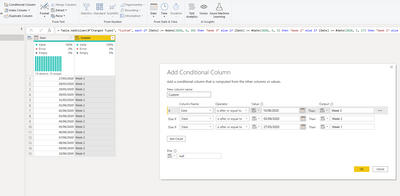
Add conditional Column,
= Table.AddColumn(#"Changed Type1", "Custom",
each if [Date] >= #date(2020, 6, 10) then "Week 3"
else if [Date] >= #date(2020, 6, 3) then "Week 2"
else if [Date] >= #date(2020, 5, 27) then "Week 1"
else null)
Check out the April 2026 Power BI update to learn about new features.
If you have recently started exploring Fabric, we'd love to hear how it's going. Your feedback can help with product improvements.
A new Power BI DataViz World Championship is coming this June! Don't miss out on submitting your entry.
| User | Count |
|---|---|
| 5 | |
| 4 | |
| 4 | |
| 4 | |
| 4 |