Join us at FabCon Atlanta from March 16 - 20, 2026, for the ultimate Fabric, Power BI, AI and SQL community-led event. Save $200 with code FABCOMM.
Register now!The Power BI Data Visualization World Championships is back! Get ahead of the game and start preparing now! Learn more
Hii,
I currently see data displayed for the next 16 weeks. How do I view the data for the past 6 weeks as well?
TodayDate = DateTime.Date(DateTime.LocalNow()),
CalendarWeek = (x as number) => Date.WeekOfYear(Date.AddDays(TodayDate,x*7)),
StartDate = (x as number) => Date.ToText(Date.StartOfWeek(Date.AddDays(TodayDate,x*7), Day.Monday),"yyyy-MM-dd"),
EndDate = (x as number) => Date.ToText(Date.EndOfWeek(Date.AddDays(TodayDate,x*7), Day.Monday),"yyyy-MM-dd"),
Solved! Go to Solution.
Hello @CatrinaExp
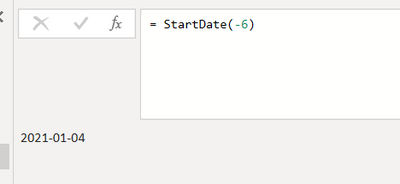
launch your function StartDate with parameter -6
Here your code with a new step
let
TodayDate = DateTime.Date(DateTime.LocalNow()),
CalendarWeek = (x as number) => Date.WeekOfYear(Date.AddDays(TodayDate,x*7)),
StartDate = (x as number) => Date.ToText(Date.StartOfWeek(Date.AddDays(TodayDate,x*7), Day.Monday),"yyyy-MM-dd"),
EndDate = (x as number) => Date.ToText(Date.EndOfWeek(Date.AddDays(TodayDate,x*7), Day.Monday),"yyyy-MM-dd"),
Minus6Weeks = StartDate(-6)
in
Minus6Weeks
Copy paste this code to the advanced editor in a new blank query to see how the solution works.
If this post helps or solves your problem, please mark it as solution (to help other users find useful content and to acknowledge the work of users that helped you)
Kudoes are nice too
Have fun
Jimmy
Hello @CatrinaExp
launch your function StartDate with parameter -6
Here your code with a new step
let
TodayDate = DateTime.Date(DateTime.LocalNow()),
CalendarWeek = (x as number) => Date.WeekOfYear(Date.AddDays(TodayDate,x*7)),
StartDate = (x as number) => Date.ToText(Date.StartOfWeek(Date.AddDays(TodayDate,x*7), Day.Monday),"yyyy-MM-dd"),
EndDate = (x as number) => Date.ToText(Date.EndOfWeek(Date.AddDays(TodayDate,x*7), Day.Monday),"yyyy-MM-dd"),
Minus6Weeks = StartDate(-6)
in
Minus6Weeks
Copy paste this code to the advanced editor in a new blank query to see how the solution works.
If this post helps or solves your problem, please mark it as solution (to help other users find useful content and to acknowledge the work of users that helped you)
Kudoes are nice too
Have fun
Jimmy
Input -6 ?
Proud to be a Super User!
Awesome Keyboard Shortcusts in Power BI, thumbs up if you like the article
My Community Blog Articles (check them out!)
My Blog - Power M code to automatically detect column types -
How to create test data using DAX!
The Power BI Data Visualization World Championships is back! Get ahead of the game and start preparing now!