Get Fabric or SQL Certified for Free.
Get certified for free when you join Fabric Data Days 2026 and dive into Fabric, Power BI, SQL, AI, and other essential data skills.
Join now- Power BI forums
- Get Help with Power BI
- Desktop
- Service
- Report Server
- Power Query
- Mobile Apps
- Developer
- DAX Commands and Tips
- Custom Visuals Development Discussion
- Health and Life Sciences
- Power BI Spanish forums
- Translated Spanish Desktop
- Training and Consulting
- Instructor Led Training
- Dashboard in a Day for Women, by Women
- Galleries
- Data Stories Gallery
- Themes Gallery
- Contests Gallery
- QuickViz Gallery
- Quick Measures Gallery
- Visual Calculations Gallery
- Fabric Apps Gallery
- Notebook Gallery
- Translytical Task Flow Gallery
- TMDL Gallery
- R Script Showcase
- Webinars and Video Gallery
- Ideas
- Custom Visuals Ideas (read-only)
- Issues
- Issues
- Events
- Upcoming Events
July 7 - July 17 | Round 2 of the Power BI Dataviz World Championships. Don't miss your chance! Learn more
- Power BI forums
- Forums
- Get Help with Power BI
- Power Query
- Matching Different Column Names in Power Query
- Subscribe to RSS Feed
- Mark Topic as New
- Mark Topic as Read
- Float this Topic for Current User
- Bookmark
- Subscribe
- Printer Friendly Page


- Mark as New
- Bookmark
- Subscribe
- Mute
- Subscribe to RSS Feed
- Permalink
- Report Inappropriate Content
Matching Different Column Names in Power Query
Hi All,
I wanted to know if you can match or merge two tables inside of power query that has different names. For example, if I have this template sheet below:
| Brand_Name | Common_Name | Constituent _Element_UOM4 |
| null | null | |
| null | null | |
| null | null | |
| null | null | |
| null | null |
And the table is the Upload Sheet that I want to merge it with:
| Brand Name | Common Name | Constituent Element UOM 4 |
| Lasso Nav | Catheter, Electrode Recording Or Probe, Electrode Recording | 2456 |
| WEBSTER CS | Catheter, Electrode Recording Or Probe, Electrode Recording | 1123 |
| Reference Patch CARTO 3 | computer, diagnostic, programmable | 3245 |
| ThermoCool SmartTouch | Cardiac Ablation Percutaneous Catheter | 5777 |
Some of the column names are not that similar some have just one name that are the same.
Your help would be greatly apreciated! 🙂
Solved! Go to Solution.

- Mark as New
- Bookmark
- Subscribe
- Mute
- Subscribe to RSS Feed
- Permalink
- Report Inappropriate Content
Hello @Shan_Drex12
if your column are not in the same order you can use a more advanced program to do that. Basically uses the column names as table and join them with a fuzzy join. Then using the table to make the renaming. Here the code
let
    TableA =
    let
        Source = Table.FromRows(Json.Document(Binary.Decompress(Binary.FromText("i45WyivNyVHSgVEKSrE6VBaLBQA=", BinaryEncoding.Base64), Compression.Deflate)), let _t = ((type nullable text) meta [Serialized.Text = true]) in type table [#"Brand_Name " = _t, Common_Name = _t, #"Constituent _Element_UOM4" = _t]),
        #"Changed Type" = Table.TransformColumnTypes(Source,{{"Brand_Name ", type text}, {"Common_Name", type text}, {"Constituent _Element_UOM4", type text}})
    in
        #"Changed Type",
    TableB =
    let
        Source = Table.FromRows(Json.Document(Binary.Decompress(Binary.FromText("pY8xD4JADIX/SnMzC6IyK2EzSoDEgTCUUoGEu5Jy+Pu9kLi5Ofd733ttGnPDdRW449tEJkM/smeNIJ+ZvErPUDKJ9pMb4KFQqHT88xrSh+PpbNqoMc/8WtV5CVn1tzOOD8nuLPnFyo4YCvQ0QnYp6wckASGxy7YX9BMOTlY/UQSLyqBoLXYzBygJ43ZPPbJayURmqCyqr2WjcZ8ZKpHg0s3oJ3FQsNLm0bFsK3yfCOApTVPTth8=", BinaryEncoding.Base64), Compression.Deflate)), let _t = ((type nullable text) meta [Serialized.Text = true]) in type table [#"Brand Name" = _t, #"Common Name" = _t, #"Constituent Element UOM 4" = _t]),
        #"Changed Type" = Table.TransformColumnTypes(Source,{{"Brand Name", type text}, {"Common Name", type text}, {"Constituent Element UOM 4", Int64.Type}})
    in
        #"Changed Type",
    GetTableFromColumnNamesA = Table.TransformColumnTypes
    (
        Table.FromList
        (
            Table.ColumnNames(TableA),
            Splitter.SplitByNothing(),
            {"A"}
        ),
        {{"A", type text}}
    ),
    GetTableFromColumnNamesB = Table.TransformColumnTypes
    (
        Table.FromList
        (
            Table.ColumnNames(TableB),
            Splitter.SplitByNothing(),
            {"B"}
        ),
        {{"B", type text}}
    ),
    GetRenamingTable = Table.FuzzyJoin
    (
        GetTableFromColumnNamesA,
        {"A"},
        GetTableFromColumnNamesB,
        {"B"},
        JoinKind.LeftOuter,
        [Threshold= 0.5, IgnoreCase=true]
    ),
    RenameAtoB = Table.RenameColumns
    (
        TableA,
        List.Zip({GetRenamingTable[A], GetRenamingTable[B]})
    ),
    CombineTables = Table.Combine
    (
        {
            RenameAtoB,
            TableB
        }
    )
in
    CombineTables
uses tableA
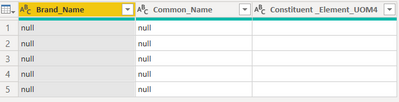
and TableB

to generate the renming table
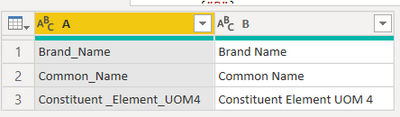
and renames table a to get this final result
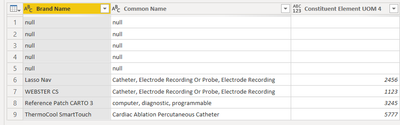
Copy paste this code to the advanced editor in a new blank query to see how the solution works.
If this post helps or solves your problem, please mark it as solution (to help other users find useful content and to acknowledge the work of users that helped you)
Kudoes are nice too
Have fun
Jimmy
- Mark as New
- Bookmark
- Subscribe
- Mute
- Subscribe to RSS Feed
- Permalink
- Report Inappropriate Content
Hello @Shan_Drex12
if your column are not in the same order you can use a more advanced program to do that. Basically uses the column names as table and join them with a fuzzy join. Then using the table to make the renaming. Here the code
let
    TableA =
    let
        Source = Table.FromRows(Json.Document(Binary.Decompress(Binary.FromText("i45WyivNyVHSgVEKSrE6VBaLBQA=", BinaryEncoding.Base64), Compression.Deflate)), let _t = ((type nullable text) meta [Serialized.Text = true]) in type table [#"Brand_Name " = _t, Common_Name = _t, #"Constituent _Element_UOM4" = _t]),
        #"Changed Type" = Table.TransformColumnTypes(Source,{{"Brand_Name ", type text}, {"Common_Name", type text}, {"Constituent _Element_UOM4", type text}})
    in
        #"Changed Type",
    TableB =
    let
        Source = Table.FromRows(Json.Document(Binary.Decompress(Binary.FromText("pY8xD4JADIX/SnMzC6IyK2EzSoDEgTCUUoGEu5Jy+Pu9kLi5Ofd733ttGnPDdRW449tEJkM/smeNIJ+ZvErPUDKJ9pMb4KFQqHT88xrSh+PpbNqoMc/8WtV5CVn1tzOOD8nuLPnFyo4YCvQ0QnYp6wckASGxy7YX9BMOTlY/UQSLyqBoLXYzBygJ43ZPPbJayURmqCyqr2WjcZ8ZKpHg0s3oJ3FQsNLm0bFsK3yfCOApTVPTth8=", BinaryEncoding.Base64), Compression.Deflate)), let _t = ((type nullable text) meta [Serialized.Text = true]) in type table [#"Brand Name" = _t, #"Common Name" = _t, #"Constituent Element UOM 4" = _t]),
        #"Changed Type" = Table.TransformColumnTypes(Source,{{"Brand Name", type text}, {"Common Name", type text}, {"Constituent Element UOM 4", Int64.Type}})
    in
        #"Changed Type",
    GetTableFromColumnNamesA = Table.TransformColumnTypes
    (
        Table.FromList
        (
            Table.ColumnNames(TableA),
            Splitter.SplitByNothing(),
            {"A"}
        ),
        {{"A", type text}}
    ),
    GetTableFromColumnNamesB = Table.TransformColumnTypes
    (
        Table.FromList
        (
            Table.ColumnNames(TableB),
            Splitter.SplitByNothing(),
            {"B"}
        ),
        {{"B", type text}}
    ),
    GetRenamingTable = Table.FuzzyJoin
    (
        GetTableFromColumnNamesA,
        {"A"},
        GetTableFromColumnNamesB,
        {"B"},
        JoinKind.LeftOuter,
        [Threshold= 0.5, IgnoreCase=true]
    ),
    RenameAtoB = Table.RenameColumns
    (
        TableA,
        List.Zip({GetRenamingTable[A], GetRenamingTable[B]})
    ),
    CombineTables = Table.Combine
    (
        {
            RenameAtoB,
            TableB
        }
    )
in
    CombineTables
uses tableA
and TableB
to generate the renming table
and renames table a to get this final result
Copy paste this code to the advanced editor in a new blank query to see how the solution works.
If this post helps or solves your problem, please mark it as solution (to help other users find useful content and to acknowledge the work of users that helped you)
Kudoes are nice too
Have fun
Jimmy
- Mark as New
- Bookmark
- Subscribe
- Mute
- Subscribe to RSS Feed
- Permalink
- Report Inappropriate Content
Thanks @MattAllington
Is there a way to automatically switch around the columns that match the other table template? Or is there a way to match the data based on linking particular data columns?

- Mark as New
- Bookmark
- Subscribe
- Mute
- Subscribe to RSS Feed
- Permalink
- Report Inappropriate Content
If the column count is the same and in the same order, it is fairly simple with this pattern @Shan_Drex12
let
    Source = Table.FromRows(Json.Document(Binary.Decompress(Binary.FromText("pY8xD4JADIX/SnMzC6IyK2EzSoDEgTCUUoGEu5Jy+Pu9kLi5Ofd733ttGnPDdRW449tEJkM/smeNIJ+ZvErPUDKJ9pMb4KFQqHT88xrSh+PpbNqoMc/8WtV5CVn1tzOOD8nuLPnFyo4YCvQ0QnYp6wckASGxy7YX9BMOTlY/UQSLyqBoLXYzBygJ43ZPPbJayURmqCyqr2WjcZ8ZKpHg0s3oJ3FQsNLm0bFsK3yfCOApTVPTth8=", BinaryEncoding.Base64), Compression.Deflate)), let _t = ((type nullable text) meta [Serialized.Text = true]) in type table [#"Brand Name" = _t, #"Common Name" = _t, #"Constituent Element UOM 4" = _t]),
    #"Appended Query" =
        Table.Combine(
            {
                Source,
                Table.RenameColumns(
                    Table1,
                        {
                            {Table.ColumnNames(Table1){0}, Table.ColumnNames(Source){0}},
                            {Table.ColumnNames(Table1){1}, Table.ColumnNames(Source){1}},
                            {Table.ColumnNames(Table1){2}, Table.ColumnNames(Source){2}}
                        }
                )
            }
        )
in
    #"Appended Query"
This is in Table2 - your second table.
It appends Table1, but instead of just getting table1, it renames the columns the same as table2, assuming they are in the same order.
Here is my PBIX file if you want to look at it work.
Did I answer your question? Mark my post as a solution!
Did my answers help arrive at a solution? Give it a kudos by clicking the Thumbs Up!
DAX is for Analysis. Power Query is for Data Modeling
Proud to be a Super User!
MCSA: BI Reporting
- Mark as New
- Bookmark
- Subscribe
- Mute
- Subscribe to RSS Feed
- Permalink
- Report Inappropriate Content
The column names have to be the same to append tables. Of course, you can change the column names in one table to match another - that will work for a small number of tables. Another approach is to demote the headers so all the columns are Col1, Col2, Col3, etc and you can remove the top row. If you do this, the column names will be appended based on position (technically it is still the name). Of course, you need to make sure the data in the columns is the same type, even if you do change column names.
* Matt is an 8 times Microsoft MVP (Power BI) and author of the Power BI Book Supercharge Power BI.
I will not give you bad advice, even if you unknowingly ask for it.

Helpful resources

FabCon & SQLCon – Barcelona 2026
Join us in Barcelona for FabCon and SQLCon, the Fabric, Power BI, SQL, and AI community event. Save €200 with code FABCMTY200.

Data Days 2026
Join Data Days 2026: 60 days of free live/on-demand sessions, challenges, study groups, and certification opportunities.

Power BI DataViz World Championships - June 2026
A new Power BI DataViz World Championship is coming this June! Don't miss out on submitting your entry.


