This is best Fabric, Power BI, SQL and AI community event. How do we know? The last event sold out! Save €200 with code FABCMTY200.
Register nowThe Fabric community is upgrading! Read all of the details including the timeline and what you can expect. Learn more
I have PowerBI Desktop connected to Azure Table Storage. After data loaded I had the table schema changed by added several new columns of data.
I tried deleted the old queries and add new data resource, during the connection the system did not promopt for key after I entered Account name, then after data loaded I saw the data was still in old schema and cannot see the new added columns.
I tried refresh after removed the credential of the data source, it did not work. I also tried in new PBIX file in same machine, not working either.
I'm trying on a new machine while I still need fix it in current machine.
Appreciate if any help on how to trouble shoot the refresh thing, or at least how to force a "new start" on data source. Thanks.
Solved! Go to Solution.
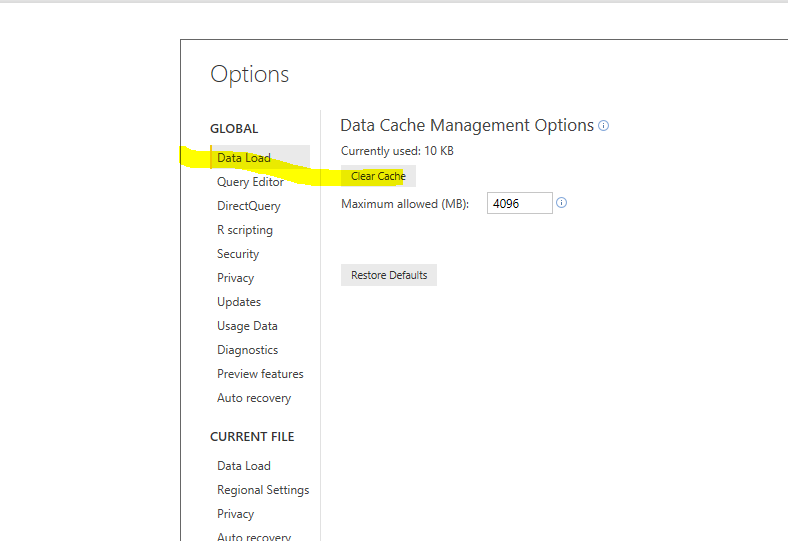
I can more or less reproduce that issue. After I clean the data cache, it works without problem. Please try click "File"->"Options and Settings"->"Options"->"Data Load"-"Clear cache".
Thanks @Eric_Zhang , this was causing me a real issue. My cache was over 3.5gb..!
I can more or less reproduce that issue. After I clean the data cache, it works without problem. Please try click "File"->"Options and Settings"->"Options"->"Data Load"-"Clear cache".
Join us in Barcelona for FabCon and SQLCon, the Fabric, Power BI, SQL, and AI community event. Save €200 with code FABCMTY200.
| User | Count |
|---|---|
| 3 | |
| 3 | |
| 3 | |
| 2 | |
| 2 |