Join us at FabCon Atlanta from March 16 - 20, 2026, for the ultimate Fabric, Power BI, AI and SQL community-led event. Save $200 with code FABCOMM.
Register now!Get Fabric certified for FREE! Don't miss your chance! Learn more
I have PowerBI Desktop connected to Azure Table Storage. After data loaded I had the table schema changed by added several new columns of data.
I tried deleted the old queries and add new data resource, during the connection the system did not promopt for key after I entered Account name, then after data loaded I saw the data was still in old schema and cannot see the new added columns.
I tried refresh after removed the credential of the data source, it did not work. I also tried in new PBIX file in same machine, not working either.
I'm trying on a new machine while I still need fix it in current machine.
Appreciate if any help on how to trouble shoot the refresh thing, or at least how to force a "new start" on data source. Thanks.
Solved! Go to Solution.
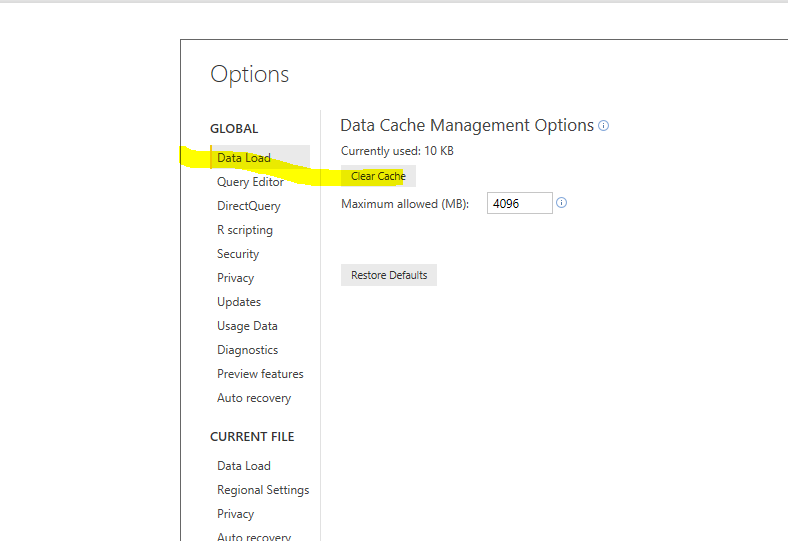
I can more or less reproduce that issue. After I clean the data cache, it works without problem. Please try click "File"->"Options and Settings"->"Options"->"Data Load"-"Clear cache".
Thanks @Eric_Zhang , this was causing me a real issue. My cache was over 3.5gb..!
I can more or less reproduce that issue. After I clean the data cache, it works without problem. Please try click "File"->"Options and Settings"->"Options"->"Data Load"-"Clear cache".
Share feedback directly with Fabric product managers, participate in targeted research studies and influence the Fabric roadmap.
Check out the February 2026 Power BI update to learn about new features.
| User | Count |
|---|---|
| 12 | |
| 12 | |
| 10 | |
| 6 | |
| 5 |