This time we’re going bigger than ever. Fabric, Power BI, SQL, AI and more. We're covering it all. You won't want to miss it.
Learn moreDid you hear? There's a new SQL AI Developer certification (DP-800). Start preparing now and be one of the first to get certified. Register now
Hello Team,
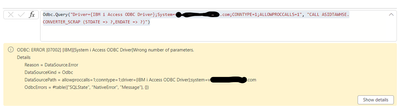
We are tyring to call DB2 (System-i) stored procedure as Direct Query in Power BI Query Editor but not sure how to use dynamic parameters. Here is the snapshot of the error message we are getting:
Any help would be appreciated.
Thank you.
Hi @chinma ,
Not sure if this will solve your problem exactly as I don't know whether this works for calling Stored Procs, but here's how to use dynamic parameters against a DB2 source:
-1- Create parameters in Power Query/Dataflow. Lets call them 'Parameter1' and Parameter2'.
-2- Add parameter placeholders to source code:
let
Source = DB2.Database("SERVER", "DATABASE"),
NativeQuery = Value.NativeQuery(
Source,
"SELECT Items, Values
FROM Table
WHERE
Field1 <= ? -- Parameter1 placeholder
AND Field2 > ? -- Parameter2 placeholder",
{Parameter1, Parameter2} -- List of Parameter names in the order used in SELECT statement
)
in
NativeQuery
Now, when you run the DB2 query, the parameter values will be picked up and inserted into the DB2 query before sending to the source.
Pete
Proud to be a Datanaut!
Check out the April 2026 Power BI update to learn about new features.
Sign up to receive a private message when registration opens and key events begin.
If you have recently started exploring Fabric, we'd love to hear how it's going. Your feedback can help with product improvements.
| User | Count |
|---|---|
| 3 | |
| 3 | |
| 3 | |
| 2 | |
| 2 |
| User | Count |
|---|---|
| 7 | |
| 5 | |
| 4 | |
| 4 | |
| 3 |