cancel
Showing results for 
Search instead for 
Did you mean: 

Learn from the best! Meet the four finalists headed to the FINALS of the Power BI Dataviz World Championships! Register now

Reply
chinma
Frequent Visitor

Calling System-i Stored Procedure as Direct Query

Hello Team,

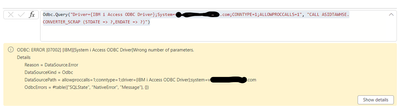
We are tyring to call DB2 (System-i) stored procedure as Direct Query in Power BI Query Editor but not sure how to use dynamic parameters.  Here is the snapshot of the error message we are getting:

chinma_0-1702543062426.png

Any help would be appreciated.

Thank you.

1 REPLY 1
BA_Pete
Super User
Super User

Hi @chinma ,


Not sure if this will solve your problem exactly as I don't know whether this works for calling Stored Procs, but here's how to use dynamic parameters against a DB2 source:


-1- Create parameters in Power Query/Dataflow. Lets call them 'Parameter1' and Parameter2'.

-2- Add parameter placeholders to source code:

let
    Source = DB2.Database("SERVER", "DATABASE"),
    NativeQuery = Value.NativeQuery(
        Source,
        "SELECT Items, Values
        FROM Table
        WHERE
            Field1 <= ?  -- Parameter1 placeholder
            AND Field2 > ?  -- Parameter2 placeholder",
        {Parameter1, Parameter2}  -- List of Parameter names in the order used in SELECT statement
    )
in
    NativeQuery


Now, when you run the DB2 query, the parameter values will be picked up and inserted into the DB2 query before sending to the source.


Pete


Now accepting Kudos! If my post helped you, why not give it a thumbs-up?

Proud to be a Datanaut!


Helpful resources

Announcements
Power BI DataViz World Championships carousel

Power BI DataViz World Championships - June 2026

A new Power BI DataViz World Championship is coming this June! Don't miss out on submitting your entry.

Join our Fabric User Panel

Join our Fabric User Panel

Share feedback directly with Fabric product managers, participate in targeted research studies and influence the Fabric roadmap.

March Power BI Update Carousel

Power BI Community Update - March 2026

Check out the March 2026 Power BI update to learn about new features.