This time we’re going bigger than ever. Fabric, Power BI, SQL, AI and more. We're covering it all. You won't want to miss it.
Learn moreDid you hear? There's a new SQL AI Developer certification (DP-800). Start preparing now and be one of the first to get certified. Register now
Dear PQ Gurus,
I'm looking to calculate a forecast which at index 0 simply takes the (Activity + (Activity * Activity Change %)), but for all other indexes takes the previous row calculated forecast and applies the current row activity change %.
Note the index resets at each change in (Cost Centre)"Code".
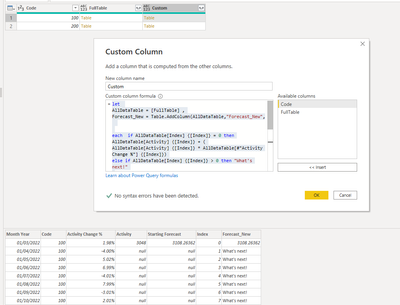
I've grouped the data by Code & built a custom column which refers to the previous index but I'm not sure how to reference the new month's forecast to then carry on the calculation.
Custom Column Code
let
AllDataTable = [FullTable] ,
Forecast_New = Table.AddColumn(AllDataTable,"Forecast_New",
each if AllDataTable[Index] {[Index]} = 0 then AllDataTable[Activity] {[Index]} + (
AllDataTable[Activity] {[Index]} * AllDataTable[#"Activity Change %"] {[Index]})
else if AllDataTable[Index] {[Index]} > 0 then "What's next!"
else null
)
in
Forecast_New
Screenshot 1
Screenshot 2
Example Data Extract
| Month Year | Code | Activity Change % | Activity | Index | Forecast | Formula | |
| 01/03/2022 | 100 | 2.0% | 3048 | 0 | 3108 | =D2+(D2*C2) | |
| 01/04/2022 | 100 | -4.0% | 1 | 2984 | =F2+(F2*C3) | ||
| 01/05/2022 | 100 | 5.0% | 2 | 3134 | |||
| 01/06/2022 | 100 | 7.0% | 3 | 3353 | |||
| 01/07/2022 | 100 | -4.0% | 4 | 3219 | |||
| 01/08/2022 | 100 | 8.0% | 5 | 3476 | |||
| 01/09/2022 | 100 | -3.0% | 6 | 3371 | |||
| 01/10/2022 | 100 | 2.0% | 7 | 3439 | |||
| 01/11/2022 | 100 | 4.0% | 8 | 3576 | |||
| 01/12/2022 | 100 | -6.0% | 9 | 3363 | |||
| 01/03/2022 | 200 | 1.7% | 3448 | 0 | 3506 | =D12+(D12*C12) | |
| 01/04/2022 | 200 | -3.4% | 1 | 3387 | =F12+(F12*C13) | ||
| 01/05/2022 | 200 | 4.2% | 2 | 3530 | |||
| 01/06/2022 | 200 | 5.9% | 3 | 3739 | |||
| 01/07/2022 | 200 | -3.4% | 4 | 3611 | |||
| 01/08/2022 | 200 | 6.8% | 5 | 3857 | |||
| 01/09/2022 | 200 | -2.6% | 6 | 3757 | |||
| 01/10/2022 | 200 | 1.7% | 7 | 3822 | |||
| 01/11/2022 | 200 | 3.4% | 8 | 3952 | |||
| 01/12/2022 | 200 | -5.2% | 9 | 3749 |
Thanks in advance
Adam
Solved! Go to Solution.
Hi @AdamPBIDev
List.Accumulate can do it
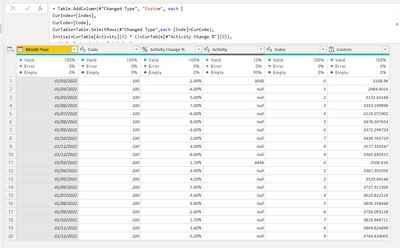
let
Source = Table.FromRows(Json.Document(Binary.Decompress(Binary.FromText("fdFbDoQgDEDRvZDMn4OllNdajPvfhjhgax3kRxJzQut12wy4FfyKgGgW4wDqEy3Ap54eKNcDzL40R9p9qcPzDaOgURCDbKI2SYxnk96HEaOsURYT2JTHRV5QvJCDcYJzOTZOm9tCmQ0+hkVBhTfi3vhDzqbWm95647U5TXpj3wonvbH/kzLp/T9s0LuhaPOkd78IbZz01gnGvZu5LTTo3YcF+fzaez8A", BinaryEncoding.Base64), Compression.Deflate)), let _t = ((type nullable text) meta [Serialized.Text = true]) in type table [#"Month Year" = _t, Code = _t, #"Activity Change %" = _t, Activity = _t, Index = _t]),
#"Changed Type" = Table.TransformColumnTypes(Source,{{"Month Year", type date}, {"Code", Int64.Type}, {"Activity Change %", Percentage.Type}, {"Activity", Int64.Type}, {"Index", Int64.Type}}),
#"Added Custom" = Table.AddColumn(#"Changed Type", "Custom", each [
CurIndex=[Index],
CurCode=[Code],
CurTable=Table.SelectRows(#"Changed Type",each [Code]=CurCode),
Initial=CurTable[Activity]{0} * (1+CurTable[#"Activity Change %"]{0}),
a=if CurIndex=0 then Initial else
List.Accumulate(List.RemoveFirstN( Table.SelectRows(CurTable,each [Index]<=CurIndex )[#"Activity Change %"],1),Initial,(s,c)=>s+s*c)][a])
in
#"Added Custom"
Hi @AdamPBIDev
List.Accumulate can do it
let
Source = Table.FromRows(Json.Document(Binary.Decompress(Binary.FromText("fdFbDoQgDEDRvZDMn4OllNdajPvfhjhgax3kRxJzQut12wy4FfyKgGgW4wDqEy3Ap54eKNcDzL40R9p9qcPzDaOgURCDbKI2SYxnk96HEaOsURYT2JTHRV5QvJCDcYJzOTZOm9tCmQ0+hkVBhTfi3vhDzqbWm95647U5TXpj3wonvbH/kzLp/T9s0LuhaPOkd78IbZz01gnGvZu5LTTo3YcF+fzaez8A", BinaryEncoding.Base64), Compression.Deflate)), let _t = ((type nullable text) meta [Serialized.Text = true]) in type table [#"Month Year" = _t, Code = _t, #"Activity Change %" = _t, Activity = _t, Index = _t]),
#"Changed Type" = Table.TransformColumnTypes(Source,{{"Month Year", type date}, {"Code", Int64.Type}, {"Activity Change %", Percentage.Type}, {"Activity", Int64.Type}, {"Index", Int64.Type}}),
#"Added Custom" = Table.AddColumn(#"Changed Type", "Custom", each [
CurIndex=[Index],
CurCode=[Code],
CurTable=Table.SelectRows(#"Changed Type",each [Code]=CurCode),
Initial=CurTable[Activity]{0} * (1+CurTable[#"Activity Change %"]{0}),
a=if CurIndex=0 then Initial else
List.Accumulate(List.RemoveFirstN( Table.SelectRows(CurTable,each [Index]<=CurIndex )[#"Activity Change %"],1),Initial,(s,c)=>s+s*c)][a])
in
#"Added Custom"
@Anonymous Thank you so much for this solution & introducing me to list.accumulate! Works a treat and is a much more elegant solution than my approach!
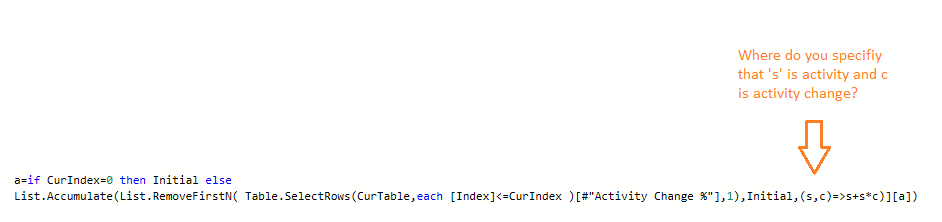
I can broadly follow the syntax, would you mind explaining where you define the s & c variable in this portion of the code i.e. how does it know to reference activity & activity change?
Thanks for your help!
In case anyone else is interested, this is an alternative solution which also seems to solve the problem (although not as neatly as Vera!)
BufferedStart = Table.Buffer( Table.Sort(Custom,{{"Code", Order.Ascending},{"Index", Order.Ascending}}) ),
Initial = BufferedStart{0},
ListGenerate = List.Generate( ()=>
[Result = Initial[Starting Forecast], Counter = 0],
each [Counter] < Table.RowCount(BufferedStart),
each [
Result = if BufferedStart[Index]{Counter} = 0 then BufferedStart[Starting Forecast]{Counter} else [Result] + ([Result] * BufferedStart[#"Activity Change %"]{Counter}),
Counter = [Counter] + 1
],
each [Result]
),
Custom2 = Table.FromColumns(Table.ToColumns(BufferedStart) & {ListGenerate} , Table.ColumnNames(BufferedStart) & {"Result"}),
Hi @AdamPBIDev
List.Generate is also very cool! I guess you understand s & c, the list does not contain the first one when you are using Activity (the variable Initial, also as the seed), the rest are all Activity Change %...
Check out the April 2026 Power BI update to learn about new features.
Sign up to receive a private message when registration opens and key events begin.
If you have recently started exploring Fabric, we'd love to hear how it's going. Your feedback can help with product improvements.