cancel
Showing results for 
Search instead for 
Did you mean: 

Data Days is here! Join us now for 60+ days of learning, challenges, and connection. Learn more

Reply
AdamPBIDev
Regular Visitor

Calculation based on Previous Row / Month

Dear PQ Gurus,


I'm looking to calculate a forecast which at index 0 simply takes the (Activity + (Activity * Activity Change %)), but for all other indexes takes the previous row calculated forecast and applies the current row activity change %. 


Note the index resets at each change in (Cost Centre)"Code".


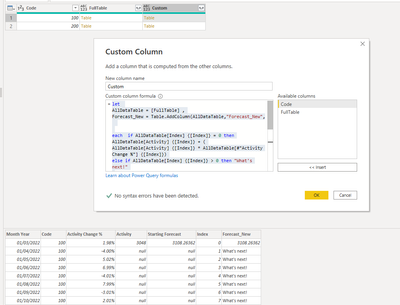
I've grouped the data by Code & built a custom column which refers to the previous index but I'm not sure how to reference the new month's forecast to then carry on the calculation. 


Custom Column Code


let
AllDataTable = [FullTable] ,
Forecast_New = Table.AddColumn(AllDataTable,"Forecast_New",

each if AllDataTable[Index] {[Index]} = 0 then AllDataTable[Activity] {[Index]} + (
AllDataTable[Activity] {[Index]} * AllDataTable[#"Activity Change %"] {[Index]})
else if AllDataTable[Index] {[Index]} > 0 then "What's next!"

else null

)
in
Forecast_New


Screenshot 1

Question 2.png


Screenshot 2

Question 1.png


Example Data Extract


Month YearCodeActivity Change %ActivityIndexForecast Formula
01/03/20221002.0%304803108 =D2+(D2*C2)
01/04/2022100-4.0% 12984 =F2+(F2*C3)
01/05/20221005.0% 23134  
01/06/20221007.0% 33353  
01/07/2022100-4.0% 43219  
01/08/20221008.0% 53476  
01/09/2022100-3.0% 63371  
01/10/20221002.0% 73439  
01/11/20221004.0% 83576  
01/12/2022100-6.0% 93363  
01/03/20222001.7%344803506 =D12+(D12*C12)
01/04/2022200-3.4% 13387 =F12+(F12*C13)
01/05/20222004.2% 23530  
01/06/20222005.9% 33739  
01/07/2022200-3.4% 43611  
01/08/20222006.8% 53857  
01/09/2022200-2.6% 63757  
01/10/20222001.7% 73822  
01/11/20222003.4% 83952  
01/12/2022200-5.2% 93749  


Thanks in advance

Adam

1 ACCEPTED SOLUTION
Anonymous
Not applicable

Hi @AdamPBIDev 


List.Accumulate can do it
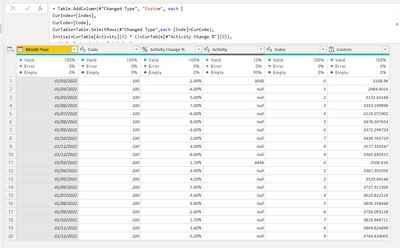
Vera_33_0-1646613986064.png

let
    Source = Table.FromRows(Json.Document(Binary.Decompress(Binary.FromText("fdFbDoQgDEDRvZDMn4OllNdajPvfhjhgax3kRxJzQut12wy4FfyKgGgW4wDqEy3Ap54eKNcDzL40R9p9qcPzDaOgURCDbKI2SYxnk96HEaOsURYT2JTHRV5QvJCDcYJzOTZOm9tCmQ0+hkVBhTfi3vhDzqbWm95647U5TXpj3wonvbH/kzLp/T9s0LuhaPOkd78IbZz01gnGvZu5LTTo3YcF+fzaez8A", BinaryEncoding.Base64), Compression.Deflate)), let _t = ((type nullable text) meta [Serialized.Text = true]) in type table [#"Month Year" = _t, Code = _t, #"Activity Change %" = _t, Activity = _t, Index = _t]),
    #"Changed Type" = Table.TransformColumnTypes(Source,{{"Month Year", type date}, {"Code", Int64.Type}, {"Activity Change %", Percentage.Type}, {"Activity", Int64.Type}, {"Index", Int64.Type}}),
    #"Added Custom" = Table.AddColumn(#"Changed Type", "Custom", each [
CurIndex=[Index],
CurCode=[Code],
CurTable=Table.SelectRows(#"Changed Type",each [Code]=CurCode),
Initial=CurTable[Activity]{0} * (1+CurTable[#"Activity Change %"]{0}),
a=if CurIndex=0 then Initial else 
List.Accumulate(List.RemoveFirstN( Table.SelectRows(CurTable,each [Index]<=CurIndex )[#"Activity Change %"],1),Initial,(s,c)=>s+s*c)][a])
in
    #"Added Custom"

 

View solution in original post

3 REPLIES 3
Anonymous
Not applicable

Hi @AdamPBIDev 


List.Accumulate can do it

Vera_33_0-1646613986064.png

let
    Source = Table.FromRows(Json.Document(Binary.Decompress(Binary.FromText("fdFbDoQgDEDRvZDMn4OllNdajPvfhjhgax3kRxJzQut12wy4FfyKgGgW4wDqEy3Ap54eKNcDzL40R9p9qcPzDaOgURCDbKI2SYxnk96HEaOsURYT2JTHRV5QvJCDcYJzOTZOm9tCmQ0+hkVBhTfi3vhDzqbWm95647U5TXpj3wonvbH/kzLp/T9s0LuhaPOkd78IbZz01gnGvZu5LTTo3YcF+fzaez8A", BinaryEncoding.Base64), Compression.Deflate)), let _t = ((type nullable text) meta [Serialized.Text = true]) in type table [#"Month Year" = _t, Code = _t, #"Activity Change %" = _t, Activity = _t, Index = _t]),
    #"Changed Type" = Table.TransformColumnTypes(Source,{{"Month Year", type date}, {"Code", Int64.Type}, {"Activity Change %", Percentage.Type}, {"Activity", Int64.Type}, {"Index", Int64.Type}}),
    #"Added Custom" = Table.AddColumn(#"Changed Type", "Custom", each [
CurIndex=[Index],
CurCode=[Code],
CurTable=Table.SelectRows(#"Changed Type",each [Code]=CurCode),
Initial=CurTable[Activity]{0} * (1+CurTable[#"Activity Change %"]{0}),
a=if CurIndex=0 then Initial else 
List.Accumulate(List.RemoveFirstN( Table.SelectRows(CurTable,each [Index]<=CurIndex )[#"Activity Change %"],1),Initial,(s,c)=>s+s*c)][a])
in
    #"Added Custom"


@Anonymous Thank you so much for this solution & introducing me to list.accumulate! Works a treat and is a much more elegant solution than my approach! 


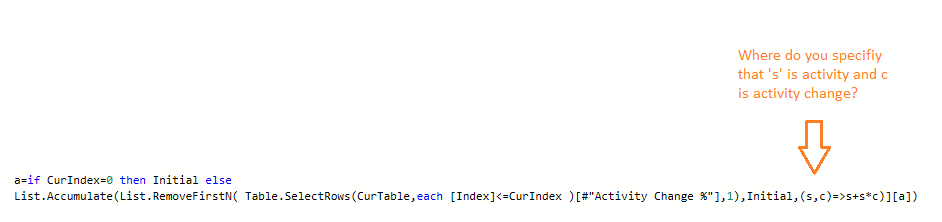
I can broadly follow the syntax, would you mind explaining  where you define the s & c variable in this portion of the code i.e. how does it know to reference activity & activity change? 

Question 5.png


Thanks for your help! 


In case anyone else is interested, this is an alternative solution which also seems to solve the problem (although not as neatly as Vera!)

  BufferedStart = Table.Buffer( Table.Sort(Custom,{{"Code", Order.Ascending},{"Index", Order.Ascending}}) ),
    Initial = BufferedStart{0},
    ListGenerate = List.Generate( ()=>
    [Result = Initial[Starting Forecast], Counter = 0],
    each [Counter] < Table.RowCount(BufferedStart),
    each [
        Result = if BufferedStart[Index]{Counter} = 0 then BufferedStart[Starting Forecast]{Counter} else [Result] + ([Result] * BufferedStart[#"Activity Change %"]{Counter}),
        Counter = [Counter] + 1
    ],
    each [Result]
),
    Custom2 = Table.FromColumns(Table.ToColumns(BufferedStart) & {ListGenerate} , Table.ColumnNames(BufferedStart) & {"Result"}),


Anonymous
Not applicable

Hi @AdamPBIDev 


List.Generate is also very cool! I guess you understand s & c, the list does not contain the first one when you are using Activity (the variable Initial, also as the seed), the rest are all Activity Change %...

Helpful resources

Announcements
Fabric Data Days is here Carousel

Fabric Data Days 2026

Don't miss out on Data Days, June 15 through August 7. Learn Fabric, Power BI, SQL, AI and more.

May Power BI Update Carousel

Power BI Monthly Update - May 2026

Check out the May 2026 Power BI update to learn about new features.

Power BI DataViz World Championships carousel

Power BI DataViz World Championships - June 2026

A new Power BI DataViz World Championship is coming this June! Don't miss out on submitting your entry.