
cancel
Showing results for 
Search instead for 
Did you mean: 

The Power BI Data Visualization World Championships is back! Get ahead of the game and start preparing now! Learn more

Reply
modwonka
Helper I
Helper I

Calculated column

Hi there,


I know this has to be really easy but I can't find the solution. Any idea?


i have two tables.


1- id clients

2- id clients, units sale per row


i would like to add a calculated column in the first table.  If the ID has more or equal than 2 units in a row from table 2 (without sum), this ID is "teacher", if the id has less of 2 units, the id would be "alumn". And third condition, if the id has different rows with less than 2 units and others row with 2 or more units, the id would be "mixed".


thanks!

1 ACCEPTED SOLUTION
Anonymous
Not applicable

Hi @modwonka ,


You can check the attachment for the detailed information.


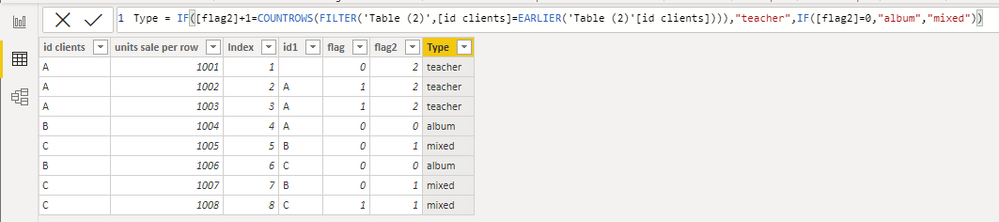
Create a index in power query and then create following calculated columns


id1 = CALCULATE(MAX('Table (2)'[id clients]),FILTER('Table (2)',[Index]=EARLIER('Table (2)'[Index])-1))
flag = IF([id clients]=[id1],1,0)
flag2 = SUMX(FILTER(ALL('Table (2)'),[id clients]=EARLIER('Table (2)'[id clients])),[flag])
Type = IF([flag2]+1=COUNTROWS(FILTER('Table (2)',[id clients]=EARLIER('Table (2)'[id clients]))),"teacher",IF([flag2]=0,"album","mixed"))


4.png


Then you can use LOOKUPVALUE to match type in the first table.

Type = LOOKUPVALUE('Table (2)'[Type],'Table (2)'[id clients],'Table'[id clients])

14.png


Best Regards,

Stephen Tao


If this post helps, then please consider Accept it as the solution to help the other members find it more quickly.

View solution in original post

2 REPLIES 2
Anonymous
Not applicable

Hi @modwonka ,


You can check the attachment for the detailed information.


Create a index in power query and then create following calculated columns


id1 = CALCULATE(MAX('Table (2)'[id clients]),FILTER('Table (2)',[Index]=EARLIER('Table (2)'[Index])-1))
flag = IF([id clients]=[id1],1,0)
flag2 = SUMX(FILTER(ALL('Table (2)'),[id clients]=EARLIER('Table (2)'[id clients])),[flag])
Type = IF([flag2]+1=COUNTROWS(FILTER('Table (2)',[id clients]=EARLIER('Table (2)'[id clients]))),"teacher",IF([flag2]=0,"album","mixed"))


4.png


Then you can use LOOKUPVALUE to match type in the first table.

Type = LOOKUPVALUE('Table (2)'[Type],'Table (2)'[id clients],'Table'[id clients])

14.png


Best Regards,

Stephen Tao


If this post helps, then please consider Accept it as the solution to help the other members find it more quickly.

AlB
Community Champion
Community Champion

Hi @modwonka 

I don't understand the requirement. Do you want to show some data, a sample of both tables and explain what you need based on that data, with the expected result?

Secondly, do you want this in DAX or Power query?


SU18_powerbi_badge

Please accept the solution when done and consider giving a thumbs up if posts are helpful. 

Contact me privately for support with any larger-scale BI needs, tutoring, etc.


Helpful resources

Announcements
Power BI DataViz World Championships

Power BI Dataviz World Championships

The Power BI Data Visualization World Championships is back! Get ahead of the game and start preparing now!

December 2025 Power BI Update Carousel

Power BI Monthly Update - December 2025

Check out the December 2025 Power BI Holiday Recap!

FabCon Atlanta 2026 carousel

FabCon Atlanta 2026

Join us at FabCon Atlanta, March 16-20, for the ultimate Fabric, Power BI, AI and SQL community-led event. Save $200 with code FABCOMM.

Top Solution Authors