Join us at FabCon Atlanta from March 16 - 20, 2026, for the ultimate Fabric, Power BI, AI and SQL community-led event. Save $200 with code FABCOMM.
Register now!Vote for your favorite vizzies from the Power BI Dataviz World Championship submissions. Vote now!
Hi there,
I know this has to be really easy but I can't find the solution. Any idea?
i have two tables.
1- id clients
2- id clients, units sale per row
i would like to add a calculated column in the first table. If the ID has more or equal than 2 units in a row from table 2 (without sum), this ID is "teacher", if the id has less of 2 units, the id would be "alumn". And third condition, if the id has different rows with less than 2 units and others row with 2 or more units, the id would be "mixed".
thanks!
Solved! Go to Solution.
Hi @modwonka ,
You can check the attachment for the detailed information.
Create a index in power query and then create following calculated columns
id1 = CALCULATE(MAX('Table (2)'[id clients]),FILTER('Table (2)',[Index]=EARLIER('Table (2)'[Index])-1))flag = IF([id clients]=[id1],1,0)flag2 = SUMX(FILTER(ALL('Table (2)'),[id clients]=EARLIER('Table (2)'[id clients])),[flag])Type = IF([flag2]+1=COUNTROWS(FILTER('Table (2)',[id clients]=EARLIER('Table (2)'[id clients]))),"teacher",IF([flag2]=0,"album","mixed"))
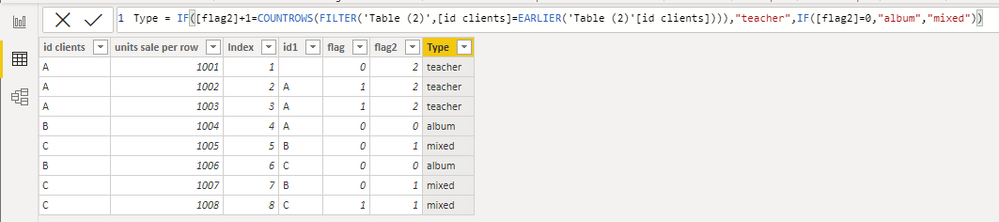
Then you can use LOOKUPVALUE to match type in the first table.
Type = LOOKUPVALUE('Table (2)'[Type],'Table (2)'[id clients],'Table'[id clients])

Best Regards,
Stephen Tao
If this post helps, then please consider Accept it as the solution to help the other members find it more quickly.
Hi @modwonka ,
You can check the attachment for the detailed information.
Create a index in power query and then create following calculated columns
id1 = CALCULATE(MAX('Table (2)'[id clients]),FILTER('Table (2)',[Index]=EARLIER('Table (2)'[Index])-1))flag = IF([id clients]=[id1],1,0)flag2 = SUMX(FILTER(ALL('Table (2)'),[id clients]=EARLIER('Table (2)'[id clients])),[flag])Type = IF([flag2]+1=COUNTROWS(FILTER('Table (2)',[id clients]=EARLIER('Table (2)'[id clients]))),"teacher",IF([flag2]=0,"album","mixed"))
Then you can use LOOKUPVALUE to match type in the first table.
Type = LOOKUPVALUE('Table (2)'[Type],'Table (2)'[id clients],'Table'[id clients])
Best Regards,
Stephen Tao
If this post helps, then please consider Accept it as the solution to help the other members find it more quickly.
Hi @modwonka
I don't understand the requirement. Do you want to show some data, a sample of both tables and explain what you need based on that data, with the expected result?
Secondly, do you want this in DAX or Power query?
|
|
Please accept the solution when done and consider giving a thumbs up if posts are helpful. Contact me privately for support with any larger-scale BI needs, tutoring, etc. |
The Power BI Data Visualization World Championships is back! It's time to submit your entry.
If you love stickers, then you will definitely want to check out our Community Sticker Challenge!
Check out the January 2026 Power BI update to learn about new features.
| User | Count |
|---|---|
| 5 | |
| 5 | |
| 4 | |
| 3 | |
| 3 |