Don't miss your chance to take the Fabric Data Engineer (DP-700) exam on us!
Learn moreWe've captured the moments from FabCon & SQLCon that everyone is talking about, and we are bringing them to the community, live and on-demand. Starts on April 14th. Register now
Hi there,
I know this has to be really easy but I can't find the solution. Any idea?
i have two tables.
1- id clients
2- id clients, units sale per row
i would like to add a calculated column in the first table. If the ID has more or equal than 2 units in a row from table 2 (without sum), this ID is "teacher", if the id has less of 2 units, the id would be "alumn". And third condition, if the id has different rows with less than 2 units and others row with 2 or more units, the id would be "mixed".
thanks!
Solved! Go to Solution.
Hi @modwonka ,
You can check the attachment for the detailed information.
Create a index in power query and then create following calculated columns
id1 = CALCULATE(MAX('Table (2)'[id clients]),FILTER('Table (2)',[Index]=EARLIER('Table (2)'[Index])-1))flag = IF([id clients]=[id1],1,0)flag2 = SUMX(FILTER(ALL('Table (2)'),[id clients]=EARLIER('Table (2)'[id clients])),[flag])Type = IF([flag2]+1=COUNTROWS(FILTER('Table (2)',[id clients]=EARLIER('Table (2)'[id clients]))),"teacher",IF([flag2]=0,"album","mixed"))
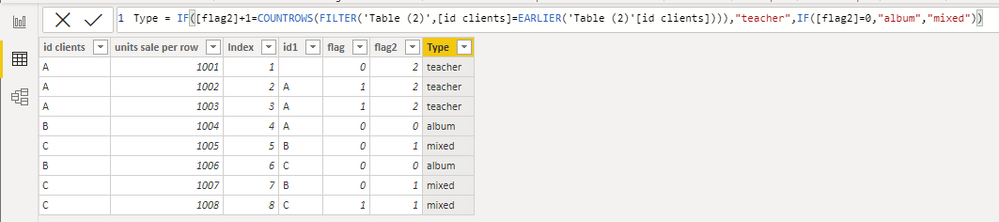
Then you can use LOOKUPVALUE to match type in the first table.
Type = LOOKUPVALUE('Table (2)'[Type],'Table (2)'[id clients],'Table'[id clients])

Best Regards,
Stephen Tao
If this post helps, then please consider Accept it as the solution to help the other members find it more quickly.
Hi @modwonka ,
You can check the attachment for the detailed information.
Create a index in power query and then create following calculated columns
id1 = CALCULATE(MAX('Table (2)'[id clients]),FILTER('Table (2)',[Index]=EARLIER('Table (2)'[Index])-1))flag = IF([id clients]=[id1],1,0)flag2 = SUMX(FILTER(ALL('Table (2)'),[id clients]=EARLIER('Table (2)'[id clients])),[flag])Type = IF([flag2]+1=COUNTROWS(FILTER('Table (2)',[id clients]=EARLIER('Table (2)'[id clients]))),"teacher",IF([flag2]=0,"album","mixed"))
Then you can use LOOKUPVALUE to match type in the first table.
Type = LOOKUPVALUE('Table (2)'[Type],'Table (2)'[id clients],'Table'[id clients])
Best Regards,
Stephen Tao
If this post helps, then please consider Accept it as the solution to help the other members find it more quickly.
Hi @modwonka
I don't understand the requirement. Do you want to show some data, a sample of both tables and explain what you need based on that data, with the expected result?
Secondly, do you want this in DAX or Power query?
|
|
Please accept the solution when done and consider giving a thumbs up if posts are helpful. Contact me privately for support with any larger-scale BI needs, tutoring, etc. |
If you have recently started exploring Fabric, we'd love to hear how it's going. Your feedback can help with product improvements.
A new Power BI DataViz World Championship is coming this June! Don't miss out on submitting your entry.
Share feedback directly with Fabric product managers, participate in targeted research studies and influence the Fabric roadmap.
| User | Count |
|---|---|
| 5 | |
| 4 | |
| 3 | |
| 3 | |
| 2 |
| User | Count |
|---|---|
| 8 | |
| 7 | |
| 6 | |
| 6 | |
| 5 |