Join us at FabCon Atlanta from March 16 - 20, 2026, for the ultimate Fabric, Power BI, AI and SQL community-led event. Save $200 with code FABCOMM.
Register now!The Power BI Data Visualization World Championships is back! Get ahead of the game and start preparing now! Learn more
i have two columns with the following values
col A col B
a 1
b 2
c 2
d 1
e 2
I would like to have a count from column B with rows that have only '2' as an entry.
I.E in this case 3 is the answer i am looking for
i have been using this formula :
Solved! Go to Solution.
Hi @hulk_deka ,
According to your description, here's my solution.
Create a measure.
M =
COUNTROWS ( FILTER ( 'Query1', 'Query1'[col B] = 2 ) )
Get the result.
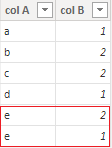
As you say "column B with rows that have only '2' as an entry", I'm not sure if you mean for example the below sample, the 2 of e should not be included, as it still as a value 1.
If this is the case, modify the formula to:
Measure =
CALCULATE (
DISTINCTCOUNT ( Query1[col A] ),
FILTER (
'Query1',
COUNTROWS (
FILTER (
'Query1',
'Query1'[col A] = EARLIER ( 'Query1'[col A] )
&& 'Query1'[col B] <> 2
)
) = 0
)
)
Get the correct result according to the modified sample.
I attach my sample below for your reference.
Best Regards,
Community Support Team _ kalyj
If this post helps, then please consider Accept it as the solution to help the other members find it more quickly.
Hi @hulk_deka ,
According to your description, here's my solution.
Create a measure.
M =
COUNTROWS ( FILTER ( 'Query1', 'Query1'[col B] = 2 ) )
Get the result.
As you say "column B with rows that have only '2' as an entry", I'm not sure if you mean for example the below sample, the 2 of e should not be included, as it still as a value 1.
If this is the case, modify the formula to:
Measure =
CALCULATE (
DISTINCTCOUNT ( Query1[col A] ),
FILTER (
'Query1',
COUNTROWS (
FILTER (
'Query1',
'Query1'[col A] = EARLIER ( 'Query1'[col A] )
&& 'Query1'[col B] <> 2
)
) = 0
)
)
Get the correct result according to the modified sample.
I attach my sample below for your reference.
Best Regards,
Community Support Team _ kalyj
If this post helps, then please consider Accept it as the solution to help the other members find it more quickly.
Use this one
= List.Count(List.Select(Query1[col B], each _=2 or _="2"))
is there any way we can use it as a measure? the above formula doesnt seem to be accepted as a measure and gives out an error.
The Power BI Data Visualization World Championships is back! Get ahead of the game and start preparing now!
| User | Count |
|---|---|
| 19 | |
| 9 | |
| 8 | |
| 7 | |
| 6 |