Share feedback directly with Fabric product managers, participate in targeted research studies and influence the Fabric roadmap.
Sign up nowGet Fabric certified for FREE! Don't miss your chance! Learn more
i have two columns with the following values
col A col B
a 1
b 2
c 2
d 1
e 2
I would like to have a count from column B with rows that have only '2' as an entry.
I.E in this case 3 is the answer i am looking for
i have been using this formula :
Solved! Go to Solution.
Hi @hulk_deka ,
According to your description, here's my solution.
Create a measure.
M =
COUNTROWS ( FILTER ( 'Query1', 'Query1'[col B] = 2 ) )
Get the result.
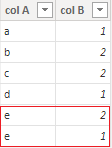
As you say "column B with rows that have only '2' as an entry", I'm not sure if you mean for example the below sample, the 2 of e should not be included, as it still as a value 1.
If this is the case, modify the formula to:
Measure =
CALCULATE (
DISTINCTCOUNT ( Query1[col A] ),
FILTER (
'Query1',
COUNTROWS (
FILTER (
'Query1',
'Query1'[col A] = EARLIER ( 'Query1'[col A] )
&& 'Query1'[col B] <> 2
)
) = 0
)
)
Get the correct result according to the modified sample.
I attach my sample below for your reference.
Best Regards,
Community Support Team _ kalyj
If this post helps, then please consider Accept it as the solution to help the other members find it more quickly.
Hi @hulk_deka ,
According to your description, here's my solution.
Create a measure.
M =
COUNTROWS ( FILTER ( 'Query1', 'Query1'[col B] = 2 ) )
Get the result.
As you say "column B with rows that have only '2' as an entry", I'm not sure if you mean for example the below sample, the 2 of e should not be included, as it still as a value 1.
If this is the case, modify the formula to:
Measure =
CALCULATE (
DISTINCTCOUNT ( Query1[col A] ),
FILTER (
'Query1',
COUNTROWS (
FILTER (
'Query1',
'Query1'[col A] = EARLIER ( 'Query1'[col A] )
&& 'Query1'[col B] <> 2
)
) = 0
)
)
Get the correct result according to the modified sample.
I attach my sample below for your reference.
Best Regards,
Community Support Team _ kalyj
If this post helps, then please consider Accept it as the solution to help the other members find it more quickly.
Use this one
= List.Count(List.Select(Query1[col B], each _=2 or _="2"))
is there any way we can use it as a measure? the above formula doesnt seem to be accepted as a measure and gives out an error.
Share feedback directly with Fabric product managers, participate in targeted research studies and influence the Fabric roadmap.
If you love stickers, then you will definitely want to check out our Community Sticker Challenge!
Check out the January 2026 Power BI update to learn about new features.
| User | Count |
|---|---|
| 7 | |
| 4 | |
| 4 | |
| 4 | |
| 3 |
| User | Count |
|---|---|
| 12 | |
| 11 | |
| 11 | |
| 7 | |
| 6 |