Join us at FabCon Atlanta from March 16 - 20, 2026, for the ultimate Fabric, Power BI, AI and SQL community-led event. Save $200 with code FABCOMM.
Register now!The Power BI Data Visualization World Championships is back! It's time to submit your entry. Live now!
i have two columns with the following values
col A col B
a 1
b 2
c 2
d 1
e 2
I would like to have a count from column B with rows that have only '2' as an entry.
I.E in this case 3 is the answer i am looking for
i have been using this formula :
Solved! Go to Solution.
Hi @hulk_deka ,
According to your description, here's my solution.
Create a measure.
M =
COUNTROWS ( FILTER ( 'Query1', 'Query1'[col B] = 2 ) )
Get the result.
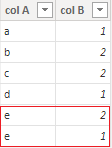
As you say "column B with rows that have only '2' as an entry", I'm not sure if you mean for example the below sample, the 2 of e should not be included, as it still as a value 1.
If this is the case, modify the formula to:
Measure =
CALCULATE (
DISTINCTCOUNT ( Query1[col A] ),
FILTER (
'Query1',
COUNTROWS (
FILTER (
'Query1',
'Query1'[col A] = EARLIER ( 'Query1'[col A] )
&& 'Query1'[col B] <> 2
)
) = 0
)
)
Get the correct result according to the modified sample.
I attach my sample below for your reference.
Best Regards,
Community Support Team _ kalyj
If this post helps, then please consider Accept it as the solution to help the other members find it more quickly.
Hi @hulk_deka ,
According to your description, here's my solution.
Create a measure.
M =
COUNTROWS ( FILTER ( 'Query1', 'Query1'[col B] = 2 ) )
Get the result.
As you say "column B with rows that have only '2' as an entry", I'm not sure if you mean for example the below sample, the 2 of e should not be included, as it still as a value 1.
If this is the case, modify the formula to:
Measure =
CALCULATE (
DISTINCTCOUNT ( Query1[col A] ),
FILTER (
'Query1',
COUNTROWS (
FILTER (
'Query1',
'Query1'[col A] = EARLIER ( 'Query1'[col A] )
&& 'Query1'[col B] <> 2
)
) = 0
)
)
Get the correct result according to the modified sample.
I attach my sample below for your reference.
Best Regards,
Community Support Team _ kalyj
If this post helps, then please consider Accept it as the solution to help the other members find it more quickly.
Use this one
= List.Count(List.Select(Query1[col B], each _=2 or _="2"))
is there any way we can use it as a measure? the above formula doesnt seem to be accepted as a measure and gives out an error.
The Power BI Data Visualization World Championships is back! It's time to submit your entry.
Check out the January 2026 Power BI update to learn about new features.
| User | Count |
|---|---|
| 14 | |
| 11 | |
| 9 | |
| 7 | |
| 7 |