Join us at FabCon Atlanta from March 16 - 20, 2026, for the ultimate Fabric, Power BI, AI and SQL community-led event. Save $200 with code FABCOMM.
Register now!The Power BI Data Visualization World Championships is back! Get ahead of the game and start preparing now! Learn more
Hey all,
This has been puzzling me for a few days, I'm hoping someone can really spell it out for me. It's my understanding that you can use the generated token on your bitly account to draw in click data to power query.
I found the following guidance however, it didn't work for me:
Easiest way to gather Bitly click data on a daily/... - Microsoft Power BI Community
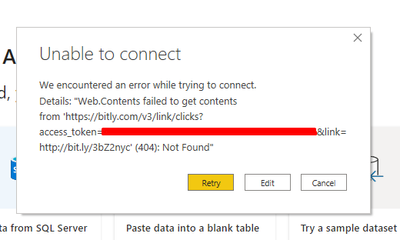
It always results in the following error:
I've also read over the API documentation on Bitly's website and most of what I'm reading is gibberish to me.
has anyone had any luck with this? if so, how did you do it?
Thanks, Karlos.
@Anonymous
I see no problem with this access and the format, 404 message is when content has been removed or moved to another URL. Please make sure you have used the correct token and url.
Paul Zheng _ Community Support Team
If this post helps, please Accept it as the solution to help the other members find it more quickly.
The Power BI Data Visualization World Championships is back! Get ahead of the game and start preparing now!
| User | Count |
|---|---|
| 17 | |
| 9 | |
| 9 | |
| 7 | |
| 7 |