
cancel
Showing results for 
Search instead for 
Did you mean: 

The Power BI Data Visualization World Championships is back! Get ahead of the game and start preparing now! Learn more

Reply
Anonymous
Not applicable

If statement

Hi all, 


I am importing data into power bi through power query and need to insert a custom column.


The formula i am trying to use is below.


IFERROR(IF([Days On Hand]>9, IFERROR(IF([Days On Hand]>9, ROUND([Inventory On Hand]/days [Days On Hand]*([Days On Hand]-9),0), 0),0)*[Standard Price], 0), 0)


However the formula is erroring and saying the 'IFERROR' is not recognized.


Could you help please.


Thanks in anticipation.


Sam

2 ACCEPTED SOLUTIONS

Hi @Anonymous ,

Actually, there are more details to be adjusted if you want to write this in M code.

IF -->  if if-condition then true-expression else false-expression

ROUND --> Number.Round


If this post answered your question, please mark it as a solution to help other users find useful content.
Kudos are another nice way to acknowledge those who tried to help you.

J. Payeras
Mallorca, Spain

View solution in original post

v-yingjl
Community Support
Community Support

Hi @Anonymous ,

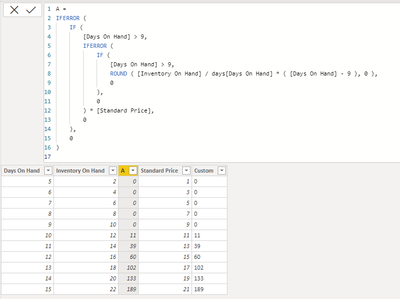
If you want to create custom columns in power query, the formula should be like this, your previous formula is used in DAX not power query:

= Table.AddColumn(#"Changed Type", "Custom", each if [Days On Hand] > 9 then Number.Round([Inventory On Hand] / [Days On Hand] * ([Days On Hand] - 9)) * [Standard Price] else 0)

1.png2.png


Attached a sample file in the below, hopes it could help.


Best Regards,
Community Support Team _ Yingjie Li
If this post helps, then please consider Accept it as the solution to help the other members find it more quickly.


View solution in original post

4 REPLIES 4
v-yingjl
Community Support
Community Support

Hi @Anonymous ,

If you want to create custom columns in power query, the formula should be like this, your previous formula is used in DAX not power query:

= Table.AddColumn(#"Changed Type", "Custom", each if [Days On Hand] > 9 then Number.Round([Inventory On Hand] / [Days On Hand] * ([Days On Hand] - 9)) * [Standard Price] else 0)

1.png2.png


Attached a sample file in the below, hopes it could help.


Best Regards,
Community Support Team _ Yingjie Li
If this post helps, then please consider Accept it as the solution to help the other members find it more quickly.


Jimmy801
Community Champion
Community Champion

Hello @Anonymous 


your formula is written in DAX and not power query. Use this formula in Power BI Desktop and not in Power Query, then it should work. Power Query is different.

Jimmy801_0-1616169891528.png


If this post helps or solves your problem, please mark it as solution (to help other users find useful content and to acknowledge the work of users that helped you)
Kudoes are nice too

Have fun

Jimmy

Payeras_BI
Solution Sage
Solution Sage

Hi @Anonymous ,

Use "try" "otherwise" instead.


If this post answered your question, please mark it as a solution to help other users find useful content.
Kudos are another nice way to acknowledge those who tried to help you.

J. Payeras
Mallorca, Spain

Hi @Anonymous ,

Actually, there are more details to be adjusted if you want to write this in M code.

IF -->  if if-condition then true-expression else false-expression

ROUND --> Number.Round


If this post answered your question, please mark it as a solution to help other users find useful content.
Kudos are another nice way to acknowledge those who tried to help you.

J. Payeras
Mallorca, Spain

Helpful resources

Announcements
Power BI DataViz World Championships

Power BI Dataviz World Championships

The Power BI Data Visualization World Championships is back! Get ahead of the game and start preparing now!

December 2025 Power BI Update Carousel

Power BI Monthly Update - December 2025

Check out the December 2025 Power BI Holiday Recap!

FabCon Atlanta 2026 carousel

FabCon Atlanta 2026

Join us at FabCon Atlanta, March 16-20, for the ultimate Fabric, Power BI, AI and SQL community-led event. Save $200 with code FABCOMM.

Top Solution Authors