cancel
Showing results for 
Search instead for 
Did you mean: 

We've captured the moments from FabCon & SQLCon that everyone is talking about, and we are bringing them to the community, live and on-demand. Starts on April 14th. Register now

Reply
Anonymous
Not applicable

Bitly API vs Power Query

Hey all, 


This has been puzzling me for a few days, I'm hoping someone can really spell it out for me. It's my understanding that you can use the generated token on your bitly account to draw in click data to power query. 

I found the following guidance however, it didn't work for me: 
Easiest way to gather Bitly click data on a daily/... - Microsoft Power BI Community
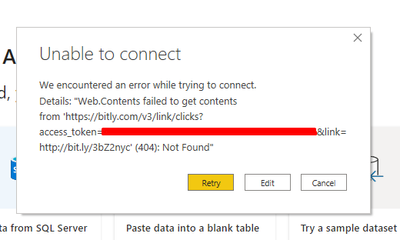
It always results in the following error:

Karlos_0-1616059795327.png


I've also read over the API documentation on Bitly's website and most of what I'm reading is gibberish to me. 

has anyone had any luck with this? if so, how did you do it? 


Thanks, Karlos. 

1 REPLY 1
Anonymous
Not applicable

@Anonymous 


I see no problem with this access and the format, 404 message is when content has been removed or moved to another URL. Please make sure you have used the correct token and url.


Paul Zheng _ Community Support Team
If this post helps, please Accept it as the solution to help the other members find it more quickly.

Helpful resources

Announcements
New to Fabric survey Carousel

New to Fabric Survey

If you have recently started exploring Fabric, we'd love to hear how it's going. Your feedback can help with product improvements.

Power BI DataViz World Championships carousel

Power BI DataViz World Championships - June 2026

A new Power BI DataViz World Championship is coming this June! Don't miss out on submitting your entry.

Join our Fabric User Panel

Join our Fabric User Panel

Share feedback directly with Fabric product managers, participate in targeted research studies and influence the Fabric roadmap.

March Power BI Update Carousel

Power BI Community Update - March 2026

Check out the March 2026 Power BI update to learn about new features.