This time we’re going bigger than ever. Fabric, Power BI, SQL, AI and more. We're covering it all. You won't want to miss it.
Learn moreDid you hear? There's a new SQL AI Developer certification (DP-800). Start preparing now and be one of the first to get certified. Register now
All our primary keys are stored in binary format, so I can append tables in the query but I can't link tables, As a result, I can't transform data on report level because my primary keys don't show up. Is there any way in dax to transform binary data to another format string, so I can see these column in the report?
Solved! Go to Solution.
Hi @alkor777,
I am afraid that you are not able to use DAX to transfer binary data to another format string.
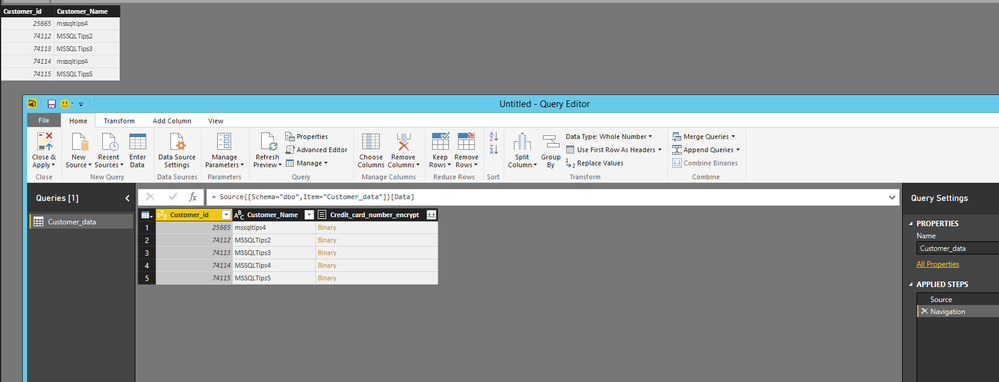
Based on my test, when I import SQL Server table which contains binary data to Power BI Desktop, even if I can see the binary data column in Query Editor of Power BI Desktop, the column is removed from the resulting table in Data view and Report view, as shown in the following screenshot.
As stated in this article, this binary data type column is currently not supported in Power BI Desktop, and an idea about this issue has been submitted in this link, please vote it. In your scenario, you would need to change the data type of primary keys columns in the original data source.
Thanks,
Lydia Zhang
Hi @alkor777,
I am afraid that you are not able to use DAX to transfer binary data to another format string.
Based on my test, when I import SQL Server table which contains binary data to Power BI Desktop, even if I can see the binary data column in Query Editor of Power BI Desktop, the column is removed from the resulting table in Data view and Report view, as shown in the following screenshot.
As stated in this article, this binary data type column is currently not supported in Power BI Desktop, and an idea about this issue has been submitted in this link, please vote it. In your scenario, you would need to change the data type of primary keys columns in the original data source.
Thanks,
Lydia Zhang
I found solution to this problem
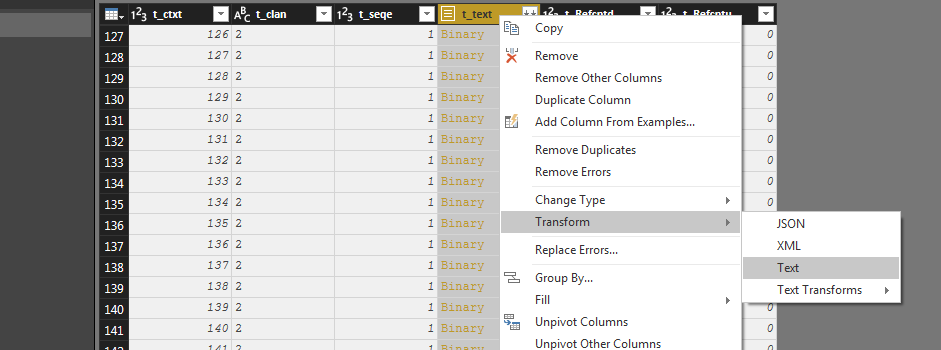
Just select the column that is having binary data in query editer and click right >> transform >> text and it is done. click close and apply you will be able to see the column with appropriate text, which otherwise was not available to see in table view.
Check out the April 2026 Power BI update to learn about new features.
Sign up to receive a private message when registration opens and key events begin.
If you have recently started exploring Fabric, we'd love to hear how it's going. Your feedback can help with product improvements.
| User | Count |
|---|---|
| 7 | |
| 5 | |
| 4 | |
| 3 | |
| 3 |