
Learn from the best! Meet the four finalists headed to the FINALS of the Power BI Dataviz World Championships! Register now
Hi,
i have a question aubout power query. Is there any posibillity to generate automatically the column caption from an table which is retrieved via api from a database?
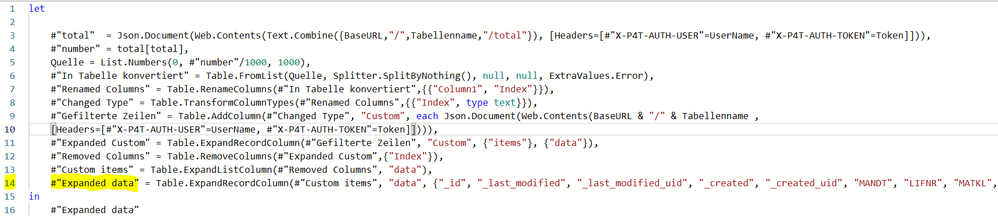
So far i have to hardcode it into my last step:
The problem is, that i want to switch beetwenn other tables and therefore i have to change this step of code by my self.
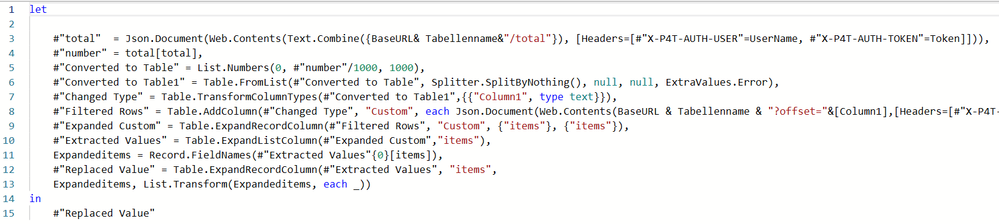
this is my code jet:
Have anyone an idea?
Thanks in advance
Solved! Go to Solution.
Since it's a record column, I think you'd use Record.FieldNames instead.
Maybe like this:
[...]
#"Custom items" = Table.ExpandListColumn(#"Removed Columns", "data"),
ColumnList = Record.FieldNames(#"Custom items"{0}[data]),
#"Expanded data" = Table.ExpandRecordColumn(#"Custom items", "data",
ColumnList, List.Transform(ColumnList, each "data." & _))
in
#"Expanded data"
Not totally clear on your scenario, but you can use Table.ColumnNames() on your [data] column to dynamically generated a list of the column names and use that in place of the hard-coded list.
Pat
To learn more about Power BI, follow me on Twitter or subscribe on YouTube.
Since it's a record column, I think you'd use Record.FieldNames instead.
Maybe like this:
[...]
#"Custom items" = Table.ExpandListColumn(#"Removed Columns", "data"),
ColumnList = Record.FieldNames(#"Custom items"{0}[data]),
#"Expanded data" = Table.ExpandRecordColumn(#"Custom items", "data",
ColumnList, List.Transform(ColumnList, each "data." & _))
in
#"Expanded data"
hi @AlexisOlson,
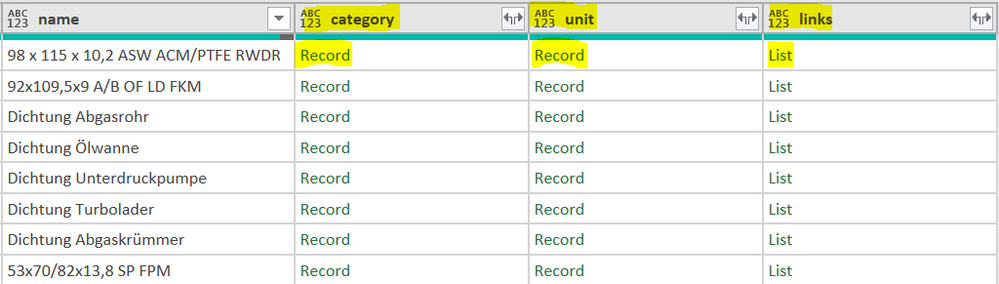
Is there also a possibility, if in the output table there are still several columns with records to output them also variably? Or du i have to output them step by step?
You could probably do it but it would likely be more trouble than it's worth unless you have a whole bunch of columns to expand.
The problem is that I would like to apply the code variably to several tables. These do not always have the same headings and therefore cannot be hard-coded.
Yes that was exactly what i was looking for 😉
A new Power BI DataViz World Championship is coming this June! Don't miss out on submitting your entry.
Share feedback directly with Fabric product managers, participate in targeted research studies and influence the Fabric roadmap.
| User | Count |
|---|---|
| 5 | |
| 4 | |
| 4 | |
| 3 | |
| 2 |
| User | Count |
|---|---|
| 11 | |
| 10 | |
| 7 | |
| 7 | |
| 6 |