
cancel
Showing results for 
Search instead for 
Did you mean: 

The Power BI Data Visualization World Championships is back! Get ahead of the game and start preparing now! Learn more

Reply
julhelp
Helper I
Helper I

Automatically generate column caption in power query

Hi,


i have a question aubout power query. Is there any posibillity to generate automatically the column caption from an table which is retrieved via api from a database? 


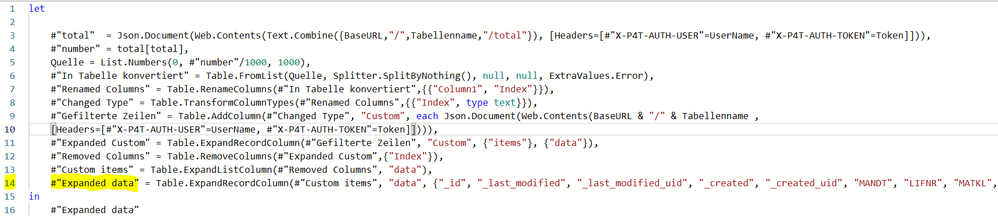
So far i have to hardcode it into my last step: 

julhelp_0-1642512172435.png

The problem is, that i want to switch beetwenn other tables and therefore i have to change this step of code by my self. 

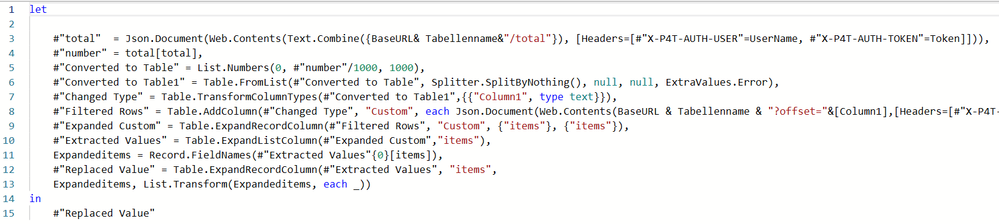
this is my code jet:

julhelp_1-1642512368264.png


Have anyone an idea?


Thanks in advance


1 ACCEPTED SOLUTION

Since it's a record column, I think you'd use Record.FieldNames instead.


Maybe like this:

[...]
    #"Custom items" = Table.ExpandListColumn(#"Removed Columns", "data"),
    ColumnList = Record.FieldNames(#"Custom items"{0}[data]),
    #"Expanded data" = Table.ExpandRecordColumn(#"Custom items", "data",
        ColumnList, List.Transform(ColumnList, each "data." & _))
in
    #"Expanded data"

View solution in original post

6 REPLIES 6
mahoneypat
Microsoft Employee
Microsoft Employee

Not totally clear on your scenario, but you can use Table.ColumnNames() on your [data] column to dynamically generated a list of the column names and use that in place of the hard-coded list.


Pat


Did I answer your question? Mark my post as a solution! Kudos are also appreciated!

To learn more about Power BI, follow me on Twitter or subscribe on YouTube.


@mahoneypa HoosierBI on YouTube


Since it's a record column, I think you'd use Record.FieldNames instead.


Maybe like this:

[...]
    #"Custom items" = Table.ExpandListColumn(#"Removed Columns", "data"),
    ColumnList = Record.FieldNames(#"Custom items"{0}[data]),
    #"Expanded data" = Table.ExpandRecordColumn(#"Custom items", "data",
        ColumnList, List.Transform(ColumnList, each "data." & _))
in
    #"Expanded data"

hi @AlexisOlson,


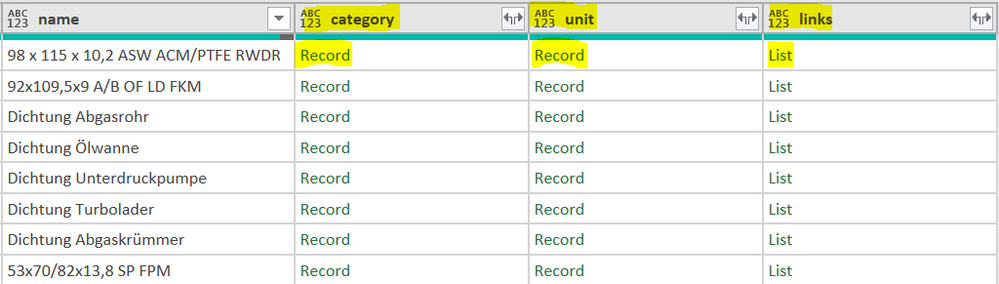
Is there also a possibility, if in the output table there are still several columns with records to output them also variably? Or du i have to output them step by step?


julhelp_0-1643805204728.png

julhelp_1-1643805258864.png


You could probably do it but it would likely be more trouble than it's worth unless you have a whole bunch of columns to expand.

The problem is that I would like to apply the code variably to several tables. These do not always have the same headings and therefore cannot be hard-coded.

Yes that was exactly what i was looking for 😉 

Helpful resources

Announcements
Power BI DataViz World Championships

Power BI Dataviz World Championships

The Power BI Data Visualization World Championships is back! Get ahead of the game and start preparing now!

December 2025 Power BI Update Carousel

Power BI Monthly Update - December 2025

Check out the December 2025 Power BI Holiday Recap!

FabCon Atlanta 2026 carousel

FabCon Atlanta 2026

Join us at FabCon Atlanta, March 16-20, for the ultimate Fabric, Power BI, AI and SQL community-led event. Save $200 with code FABCOMM.

Top Solution Authors