Get certified for free when you join Fabric Data Days 2026 and dive into Fabric, Power BI, SQL, AI, and other essential data skills.
Join nowJuly 28 - August 9 | Final Round of the Power BI Dataviz World Championships. This is your chance. Learn more
Hi All,
Wondering if the following is possible: In my data set I have 2 columns, Unit and SubUnit. Within each Unit are multiple SubUnits (ex. Unit 2000 - 2001, 2002, 2003.. as SubUnits).
There are instances where within a Unit there is no listed subunit. When that happens, the SubUnit cell is blank. I was wondering if there was a way to put in a formula or script that would detect the blank, and copy over the Unit value into the Subunit (ex. Unit 2300 - blank Subunit... would want to copy over 2300 into the Subunit as well)
Here is a sample of my data:
| Unit | SubUnit |
| 2000 | 2001 |
| 2000 | 2001 |
| 2000 | 2002 |
| 2000 | 2004 |
| 2300 | |
| 2200 | 2201 |
| 2200 | 2203 |
| 2300 | |
| 2300 | |
| 2000 | 2003 |
| 2400 | |
| 2200 | 2202 |
| 2200 | 2201 |
| 2400 | |
| 2200 | 2205 |
Any help/guidance is very much appreciated!
Thanks,
RP
Solved! Go to Solution.
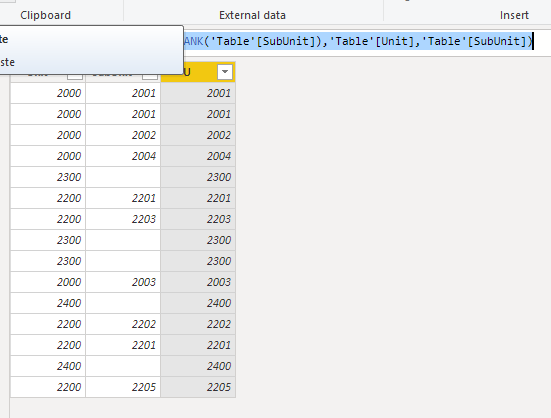
Hi @rpatel-cct ,
To create a calculated column as below.
U = IF(ISBLANK('Table'[SubUnit]),'Table'[Unit],'Table'[SubUnit])
Hi @rpatel-cct ,
To create a calculated column as below.
U = IF(ISBLANK('Table'[SubUnit]),'Table'[Unit],'Table'[SubUnit])
Thank you so much!
Since the blanks will be null when you import that, the easiest thing would to be create a new column with the following and then deleting the original SubUnit
=if [SubUnit] = null then [Unit] else [SubUnit])
Join us in Barcelona for FabCon and SQLCon, the Fabric, Power BI, SQL, and AI community event. Save €200 with code FABCMTY200.
If you love stickers, then you will definitely want to check out our community sticker challenge, Barcelona edition!
Check out the July 2026 Power BI update to learn about new features.