cancel
Showing results for 
Search instead for 
Did you mean: 

Vote for your favorite vizzies from the Power BI Dataviz World Championship submissions. Vote now!

Reply
joshua1990
Post Prodigy
Post Prodigy

Add Leading Zeros within String

Hi experts!

I have a column with year and week information in this format:

Year-Week
2022-01
2023-03
2023-3
2023-5


As you can see for the week number there are cases without any leading zero.

How can I add this missing information with PQ?

1 ACCEPTED SOLUTION
Vijay_A_Verma
Most Valuable Professional

Insert this statement 

= Table.ReplaceValue(Source, each [#"Year-Week"], each if Text.Length(Text.AfterDelimiter([#"Year-Week"],"-"))=1 then Text.ReplaceRange([#"Year-Week"],5,1,Text.PadStart(Text.End([#"Year-Week"],1),2,"0")) else [#"Year-Week"], Replacer.ReplaceValue,{"Year-Week"})

View solution in original post

3 REPLIES 3
Peter_Beck
Resolver II
Resolver II

Hi -


Here is one solution. 


let
Source = Table.FromRows(Json.Document(Binary.Decompress(Binary.FromText("i45WMjIwMtI1MFSK1YGxjWFsY10kpqlSbCwA", BinaryEncoding.Base64), Compression.Deflate)), let _t = ((type nullable text) meta [Serialized.Text = true]) in type table [#"Year-Week" = _t]),

NewVal = Table.TransformColumns(Source, {"Year-Week", each if Text.Length(_) = 6 then Text.Insert( _,5,"0") else _})
in
NewVal


We are calling Table.TransformColumns, and for each entry checking the length. If the length is too short (i.e. 6 characters) we call Text.Insert on the value and insert a "0", otherwise return the original. 


Hope this helps -


Peter

Vijay_A_Verma
Most Valuable Professional

Insert this statement 

= Table.ReplaceValue(Source, each [#"Year-Week"], each if Text.Length(Text.AfterDelimiter([#"Year-Week"],"-"))=1 then Text.ReplaceRange([#"Year-Week"],5,1,Text.PadStart(Text.End([#"Year-Week"],1),2,"0")) else [#"Year-Week"], Replacer.ReplaceValue,{"Year-Week"})
serpiva64
Solution Sage
Solution Sage

Hi,

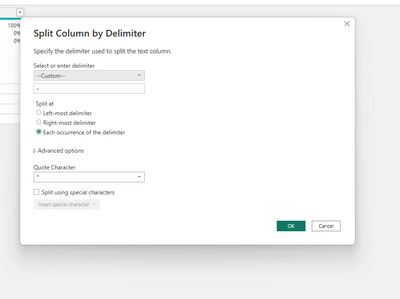
you can split your column by delimiter -

serpiva64_0-1678642945266.png

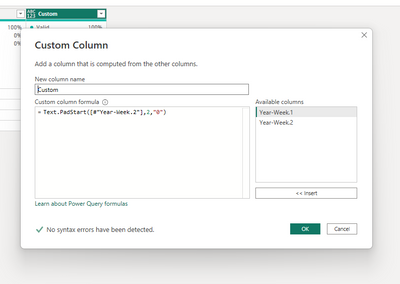
then add a custom column

serpiva64_1-1678643051790.png

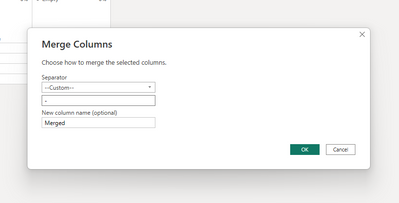
and merge again your column

serpiva64_2-1678643096466.png

If this post is useful to help you to solve your issue, consider giving the post a thumbs up and accepting it as a solution!


Helpful resources

Announcements
Power BI DataViz World Championships

Power BI Dataviz World Championships

Vote for your favorite vizzies from the Power BI World Championship submissions!

Sticker Challenge 2026 Carousel

Join our Community Sticker Challenge 2026

If you love stickers, then you will definitely want to check out our Community Sticker Challenge!

January Power BI Update Carousel

Power BI Monthly Update - January 2026

Check out the January 2026 Power BI update to learn about new features.

FabCon Atlanta 2026 carousel

FabCon Atlanta 2026

Join us at FabCon Atlanta, March 16-20, for the ultimate Fabric, Power BI, AI and SQL community-led event. Save $200 with code FABCOMM.