cancel
Showing results for 
Search instead for 
Did you mean: 

Next up in the FabCon + SQLCon recap series: The roadmap for Microsoft SQL and Maximizing Developer experiences in Fabric. All sessions are available on-demand after the live show. Register now

Reply
joshua1990
Post Prodigy
Post Prodigy

Add Leading Zeros within String

Hi experts!

I have a column with year and week information in this format:

Year-Week
2022-01
2023-03
2023-3
2023-5


As you can see for the week number there are cases without any leading zero.

How can I add this missing information with PQ?

1 ACCEPTED SOLUTION
Vijay_A_Verma
Most Valuable Professional

Insert this statement 

= Table.ReplaceValue(Source, each [#"Year-Week"], each if Text.Length(Text.AfterDelimiter([#"Year-Week"],"-"))=1 then Text.ReplaceRange([#"Year-Week"],5,1,Text.PadStart(Text.End([#"Year-Week"],1),2,"0")) else [#"Year-Week"], Replacer.ReplaceValue,{"Year-Week"})

View solution in original post

3 REPLIES 3
Peter_Beck
Resolver II
Resolver II

Hi -


Here is one solution. 


let
Source = Table.FromRows(Json.Document(Binary.Decompress(Binary.FromText("i45WMjIwMtI1MFSK1YGxjWFsY10kpqlSbCwA", BinaryEncoding.Base64), Compression.Deflate)), let _t = ((type nullable text) meta [Serialized.Text = true]) in type table [#"Year-Week" = _t]),

NewVal = Table.TransformColumns(Source, {"Year-Week", each if Text.Length(_) = 6 then Text.Insert( _,5,"0") else _})
in
NewVal


We are calling Table.TransformColumns, and for each entry checking the length. If the length is too short (i.e. 6 characters) we call Text.Insert on the value and insert a "0", otherwise return the original. 


Hope this helps -


Peter

Vijay_A_Verma
Most Valuable Professional

Insert this statement 

= Table.ReplaceValue(Source, each [#"Year-Week"], each if Text.Length(Text.AfterDelimiter([#"Year-Week"],"-"))=1 then Text.ReplaceRange([#"Year-Week"],5,1,Text.PadStart(Text.End([#"Year-Week"],1),2,"0")) else [#"Year-Week"], Replacer.ReplaceValue,{"Year-Week"})
serpiva64
Solution Sage
Solution Sage

Hi,

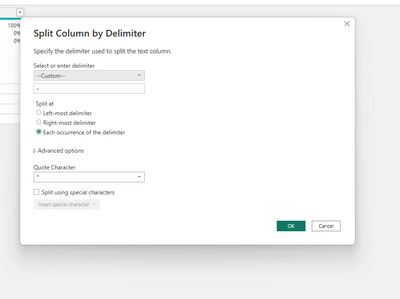
you can split your column by delimiter -

serpiva64_0-1678642945266.png

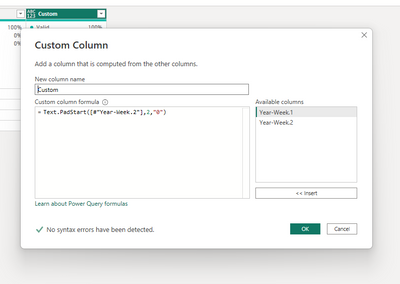
then add a custom column

serpiva64_1-1678643051790.png

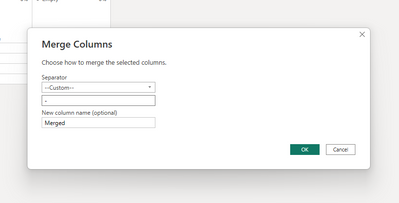
and merge again your column

serpiva64_2-1678643096466.png

If this post is useful to help you to solve your issue, consider giving the post a thumbs up and accepting it as a solution!


Helpful resources

Announcements
April Power BI Update Carousel

Power BI Monthly Update - April 2026

Check out the April 2026 Power BI update to learn about new features.

New to Fabric survey Carousel

New to Fabric Survey

If you have recently started exploring Fabric, we'd love to hear how it's going. Your feedback can help with product improvements.

Power BI DataViz World Championships carousel

Power BI DataViz World Championships - June 2026

A new Power BI DataViz World Championship is coming this June! Don't miss out on submitting your entry.

FabCon and SQLCon Highlights Carousel

FabCon &SQLCon Highlights

Experience the highlights from FabCon & SQLCon, available live and on-demand starting April 14th.