This is best Fabric, Power BI, SQL and AI community event. How do we know? The last event sold out! Save €200 with code FABCMTY200.
Register nowA new Data Days event is coming soon! This time we’re going bigger than ever. Fabric, Power BI, SQL, AI and more. Don't miss out.
Hello,
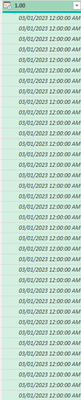
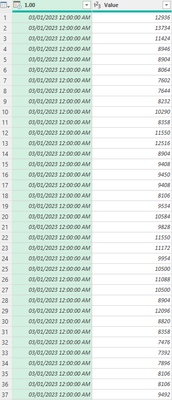
I have a column with date/time stamps where I need the time stamps to be in 30 min increments, so instead of 03/01/2023 12:00:00 AM listed over 48 times I need row two to say 03/01/2023 12:30:00, then row 3 to say 03/01/2023 01:00:00, and so on. How can I do this in Power Query? (Bonus if it's 24 hr format)
Thank you!
Solved! Go to Solution.
@LHub Add an Index column starting at 0 and then a custom column:
= Table.AddColumn(#"Added Index", "Custom", each [Column1] + #duration(0,0,30,0) * [Index])
Thank you! It was skipping every other day so I added a Modulo column up to 48 and that worked! 🎉
@LHub Is this column all by itself or in a table with other columns?
List.DateTimes( #datetime(2023, 3, 1, 0, 0, 0), 48, #duration(0,0,30,0))
There are two columns, first is date/time stamp, second contains values associated with that date/time stamp.
@LHub Add an Index column starting at 0 and then a custom column:
= Table.AddColumn(#"Added Index", "Custom", each [Column1] + #duration(0,0,30,0) * [Index])
Sign up to receive a private message when registration opens and key events begin.
If you have recently started exploring Fabric, we'd love to hear how it's going. Your feedback can help with product improvements.