cancel
Showing results for 
Search instead for 
Did you mean: 

The FabCon + SQLCon recap series starts April 14th at 8am Pacific. If you’re tracking where AI is going inside Fabric, this first session is a can't miss. Register now

Reply
AldoSaucedo
Frequent Visitor

Use row-level security with Power BI embedded content

Hi All,


I'm trying to embed Power BI reports in a Web Application and I'm following this tutorials 

Embed a Power BI report for your customers    

Use Row-Level Security with Power BI embedded

and using the base code from Github sample App Owns Data Sample


My Power BI Reports are connected to an Azure Analysis Service Model and there I have some roles created to test the

Row-Level Security.


I'm trying to pass a test username from the app to the AAS Model in order to restrtric the data they can see based on the Roles created. Here's my code:


var rls = new EffectiveIdentity("guest@contoso.com", new List<string> { report.DatasetId }, null, "guest@contoso.com");
if (!string.IsNullOrWhiteSpace(roles))
{
   var rolesList = new List<string>();
   rolesList.AddRange(roles.Split(','));
   rls.Roles = rolesList;
}
// Generate Embed Token with effective identities.
generateTokenRequestParameters = new GenerateTokenRequest(accessLevel: "view", identities: new List<EffectiveIdentity> { rls });

But I get this error when trying to see the embedded report:


"Creating embed token for accessing dataset xxxxxxxxxxx requries effective identity username to be identical to the caller's principal name"


If I pass the caller's principal username the report obviusly works ok., but I want to pass another username to test 

Row-Level security. As you can see I'm also passing a value to CUSTOMDATA() property, which is being used in a DAX for one of my roles but my data is not being filtered correctly
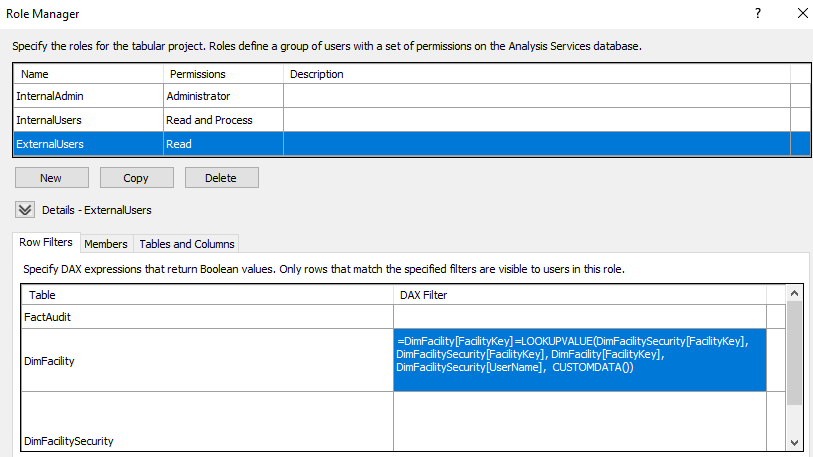
 

Capture.PNG

 
Does anyone have and Idea on what could be happening or if I missing something?


Regards,

4 REPLIES 4
v-jiascu-msft
Microsoft Employee
Microsoft Employee

Hi @AldoSaucedo,


1. Is it a live connection?

>>>The CustomData feature will only work for models that reside in Azure Analysis Services, and it only works in live mode. 

2. Does it have same format with "DimFacilitySecurity[UserName]"?


Best Regards,

Dale

Community Support Team _ Dale
If this post helps, then please consider Accept it as the solution to help the other members find it more quickly.

HI @v-jiascu-msft,


1 - Yes, is a live connection.

2 - if you mean DimFacilitySecurity[UserName] has the same format as CustomData(), the answeer is yes


DimFaciltySecurity table


FacilityKey       FacilityName         UserName
1                      Master Forms      guest@contoso.com


Regards,

@AldoSaucedo  did you ever get this resolved? I'm having the same issue.

I finally got this resolved and posted my solution on my question thread.

Helpful resources

Announcements
New to Fabric survey Carousel

New to Fabric Survey

If you have recently started exploring Fabric, we'd love to hear how it's going. Your feedback can help with product improvements.

Power BI DataViz World Championships carousel

Power BI DataViz World Championships - June 2026

A new Power BI DataViz World Championship is coming this June! Don't miss out on submitting your entry.

Join our Fabric User Panel

Join our Fabric User Panel

Share feedback directly with Fabric product managers, participate in targeted research studies and influence the Fabric roadmap.

March Power BI Update Carousel

Power BI Community Update - March 2026

Check out the March 2026 Power BI update to learn about new features.