Get certified for free when you join Fabric Data Days 2026 and dive into Fabric, Power BI, SQL, AI, and other essential data skills.
Join nowJuly 28 - August 9 | Final Round of the Power BI Dataviz World Championships. This is your chance. Learn more
Hi, I'm having difficulty setting up Power BI Embedded sample app for a dashboard. I used the sample app to upload the PBIX file, which has only two tables imported from Azure SQL using Direct Query. I provisioned the Workspace Collection and created workspace, and updated the web.config with relevant information. When I run the Power BI embedded sample web application, it shows the dashboard and correct titles for the visuals. However, it doesn't render the visuals (technical details show 401 error). I have specified the connection string using the sample app. When I publish the PBIX file to powerbi.com, I need to manually enter the credentials when viewing the dashboard. Has anyone faced a similar problem? Please help.
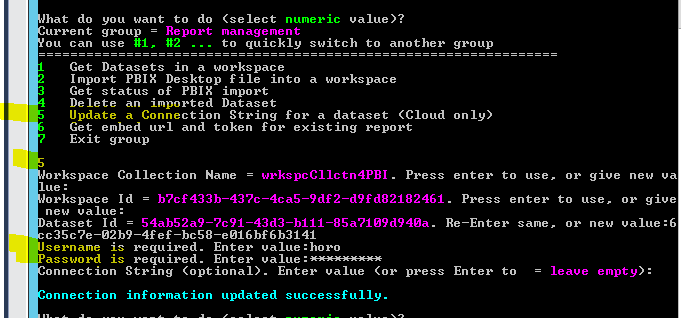
Did you configure the credential for the dataset that using direct query in Power BI Embedded?
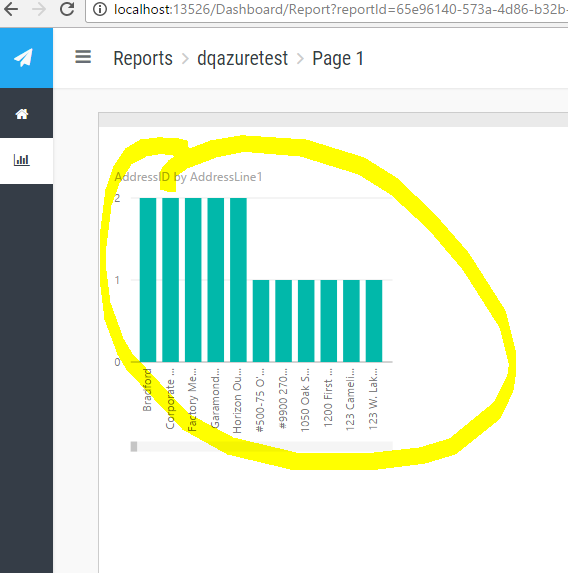
The visual is rendered with data after setting the username and password.
If you love stickers, then you will definitely want to check out our community sticker challenge, Barcelona edition!
Check out the July 2026 Power BI update to learn about new features.
| User | Count |
|---|---|
| 2 | |
| 1 | |
| 1 | |
| 1 | |
| 1 |
| User | Count |
|---|---|
| 4 | |
| 3 | |
| 2 | |
| 1 | |
| 1 |