This time we’re going bigger than ever. Fabric, Power BI, SQL, AI and more. We're covering it all. You won't want to miss it.
Learn moreDid you hear? There's a new SQL AI Developer certification (DP-800). Start preparing now and be one of the first to get certified. Register now
Hello,
I am working with a project where I am trying to make the Power BI Report 100% of the screen. Currently, I am hosting the project with Microsoft Azure and importing Power BI Desktop files using Power BI Embedded. I am using the Embed Sample provided my Microsoft to make this happen - https://github.com/Azure-Samples/power-bi-embedded-integrate-report-into-web-app/
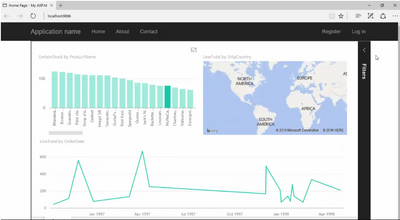
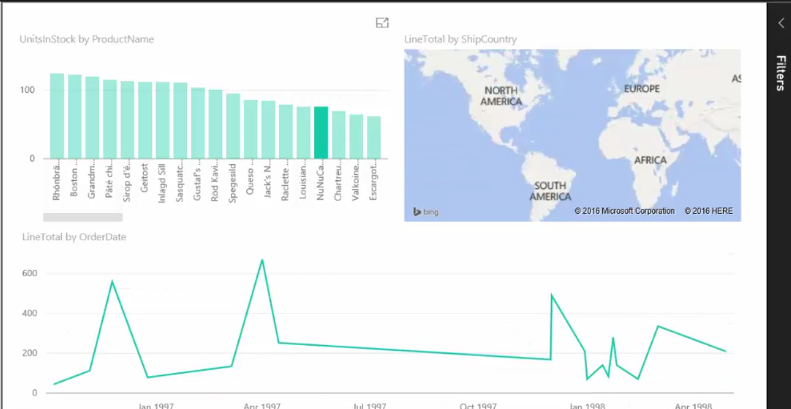
My problem is that I want to make the Power BI Report Iframe fill 100% of the page. I have limited experience with Visual Studio. Currently, it has other tabs that I do not want included. The first image is the current view of the report. The second image is the desired view of the report.
I am trying to edit the Iframe in visual studio code (last image). What should I do?
Tyler
So I'm indebted to ChatGPT for this answer! Here's my HTML:
<div class="Iframe"><iframe allowfullscreen="true" frameborder="0" height="100%" src="https://app.powerbi.com/view?r=eyJrIjoiNzA3OTEwZjMtODI0My00MWU3LWJlMjEtMGU4YjkwMmExNDgxIiwidCI6IjFiOWNlOTk2LWEwY2MtNDc4Yi1iMjM3LWNjNjUyMzFhNjZmYiIsImMiOjh9" title="20th anniverary report" width="100%"></iframe></div>
And here's the relevant CSS:
div.Iframe {
position: relative;
padding-bottom: 56.25%; /* 16:9 Aspect Ratio (56.25% = 9/16 * 100) */
margin: 3rem 5%;
iframe {
border: 1px solid $grey;
position: absolute;
top: 0;
left: 0;
width: 100%;
height: 100%;
}
}
You can see this in action here (link goes live later today).
Can you try to change the iframe style to
<iframe style="position:absolute; height:100%; width:100%; border: none">
Thanks for the tip! Still good advice!
Check out the April 2026 Power BI update to learn about new features.
Sign up to receive a private message when registration opens and key events begin.
If you have recently started exploring Fabric, we'd love to hear how it's going. Your feedback can help with product improvements.
| User | Count |
|---|---|
| 4 | |
| 2 | |
| 1 | |
| 1 | |
| 1 |