Join us at FabCon Atlanta from March 16 - 20, 2026, for the ultimate Fabric, Power BI, AI and SQL community-led event. Save $200 with code FABCOMM.
Register now!The Power BI Data Visualization World Championships is back! It's time to submit your entry. Live now!
Hello,
I am working with a project where I am trying to make the Power BI Report 100% of the screen. Currently, I am hosting the project with Microsoft Azure and importing Power BI Desktop files using Power BI Embedded. I am using the Embed Sample provided my Microsoft to make this happen - https://github.com/Azure-Samples/power-bi-embedded-integrate-report-into-web-app/
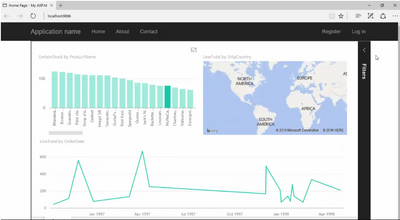
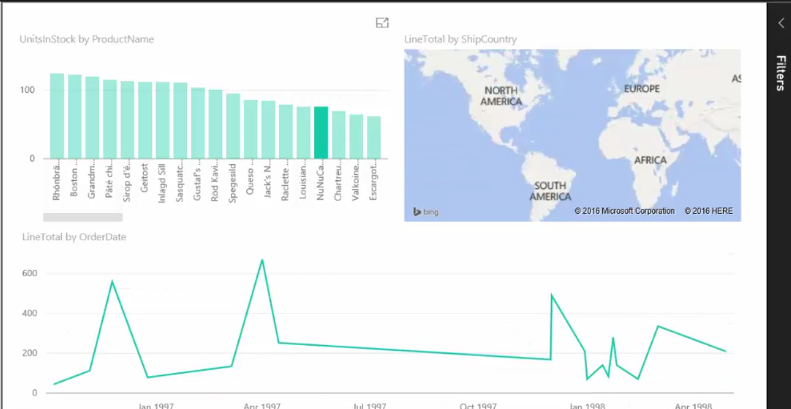
My problem is that I want to make the Power BI Report Iframe fill 100% of the page. I have limited experience with Visual Studio. Currently, it has other tabs that I do not want included. The first image is the current view of the report. The second image is the desired view of the report.
I am trying to edit the Iframe in visual studio code (last image). What should I do?
Tyler
So I'm indebted to ChatGPT for this answer! Here's my HTML:
<div class="Iframe"><iframe allowfullscreen="true" frameborder="0" height="100%" src="https://app.powerbi.com/view?r=eyJrIjoiNzA3OTEwZjMtODI0My00MWU3LWJlMjEtMGU4YjkwMmExNDgxIiwidCI6IjFiOWNlOTk2LWEwY2MtNDc4Yi1iMjM3LWNjNjUyMzFhNjZmYiIsImMiOjh9" title="20th anniverary report" width="100%"></iframe></div>
And here's the relevant CSS:
div.Iframe {
position: relative;
padding-bottom: 56.25%; /* 16:9 Aspect Ratio (56.25% = 9/16 * 100) */
margin: 3rem 5%;
iframe {
border: 1px solid $grey;
position: absolute;
top: 0;
left: 0;
width: 100%;
height: 100%;
}
}
You can see this in action here (link goes live later today).
Can you try to change the iframe style to
<iframe style="position:absolute; height:100%; width:100%; border: none">
Thanks for the tip! Still good advice!
The Power BI Data Visualization World Championships is back! It's time to submit your entry.
Check out the January 2026 Power BI update to learn about new features.
| User | Count |
|---|---|
| 4 | |
| 3 | |
| 2 | |
| 1 | |
| 1 |
| User | Count |
|---|---|
| 4 | |
| 4 | |
| 4 | |
| 3 | |
| 2 |