cancel
Showing results for 
Search instead for 
Did you mean: 

July 28 - August 9 | Final Round of the Power BI Dataviz World Championships. This is your chance. Learn more

Reply
mroomi
Helper II
Helper II

Narrative Visual

Hi,

I;m trying to use the newly added Narrative Visual into my report and it is finally working. I'm trying to change the wordings e.g. it uses a word series where I want to say documents. Any idea how to do that?


Thanks,

Roomi

1 REPLY 1
piyush
Frequent Visitor

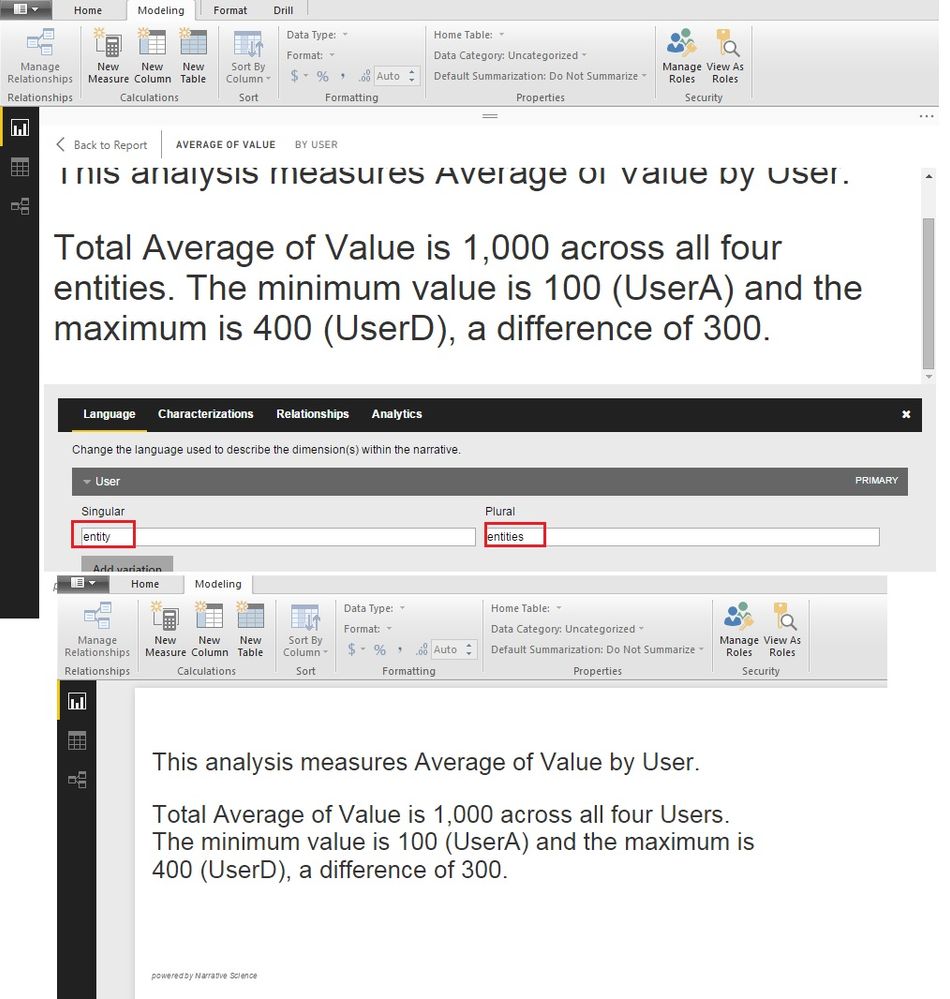
@mroomi: When you keep the cursor on the Narrative visual, there will be a gear icon. You will be able to see the "Language" tab, there you can change the wordings. 

For example; In the screenshot attached, visual word "entity" which i want to change to "user". You can edit this words, the visual will update the wordings accordingly.


Narrative Example.jpg

Helpful resources

Announcements
Fabric Community Sticker Design Challenge Barcelona Carousel

Fabric Community Sticker Challenge - Barcelona 2026

If you love stickers, then you will definitely want to check out our community sticker challenge, Barcelona edition!

July Power BI Update Carousel

Power BI Monthly Update - July 2026

Check out the July 2026 Power BI update to learn about new features.

Power BI DataViz World Championships carousel

Power BI DataViz World Championships - June 2026

A new Power BI DataViz World Championship is coming this June! Don't miss out on submitting your entry.