cancel
Showing results for 
Search instead for 
Did you mean: 

Data Days is here! Join us now for 60+ days of learning, challenges, and connection. Learn more

Reply
mroomi
Helper II
Helper II

Narrative Visual

Hi,

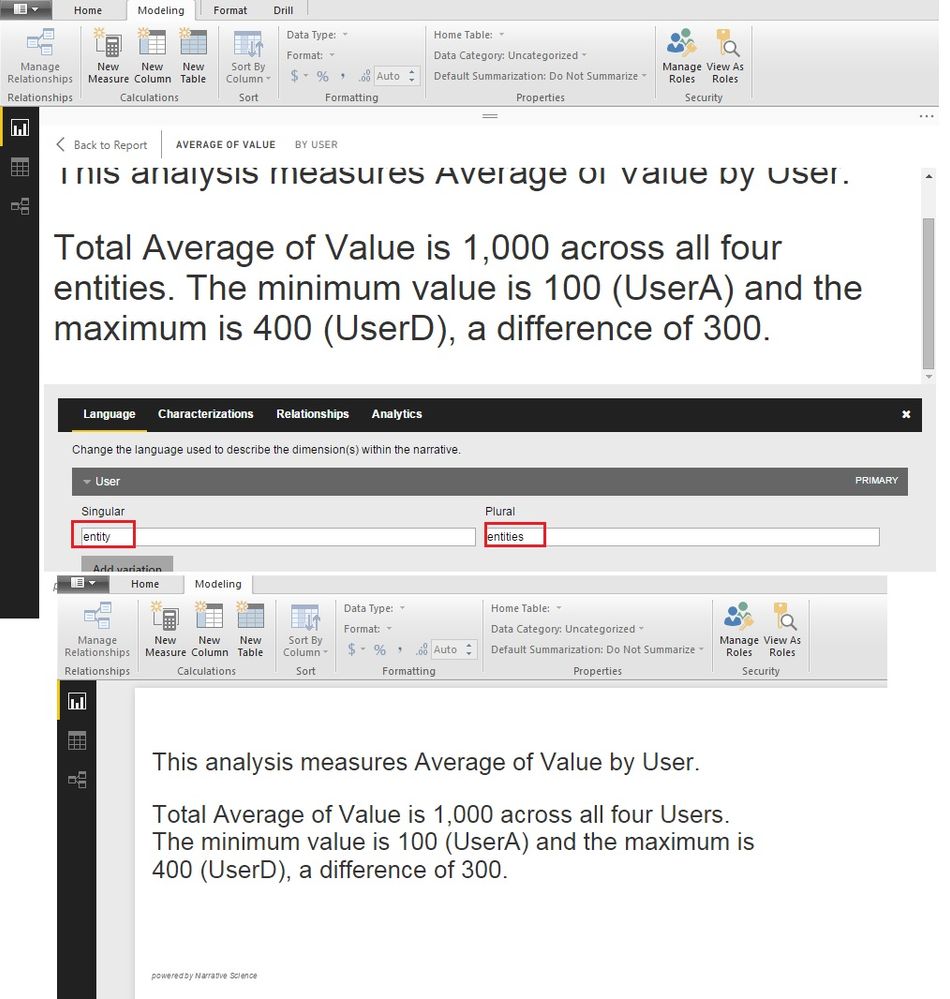
I;m trying to use the newly added Narrative Visual into my report and it is finally working. I'm trying to change the wordings e.g. it uses a word series where I want to say documents. Any idea how to do that?


Thanks,

Roomi

1 REPLY 1
piyush
Frequent Visitor

@mroomi: When you keep the cursor on the Narrative visual, there will be a gear icon. You will be able to see the "Language" tab, there you can change the wordings. 

For example; In the screenshot attached, visual word "entity" which i want to change to "user". You can edit this words, the visual will update the wordings accordingly.


Narrative Example.jpg

Helpful resources

Announcements
Fabric Data Days is here Carousel

Fabric Data Days 2026

Don't miss out on Data Days, June 15 through August 7. Learn Fabric, Power BI, SQL, AI and more.

May Power BI Update Carousel

Power BI Monthly Update - May 2026

Check out the May 2026 Power BI update to learn about new features.

Power BI DataViz World Championships carousel

Power BI DataViz World Championships - June 2026

A new Power BI DataViz World Championship is coming this June! Don't miss out on submitting your entry.

Top Kudoed Authors