cancel
Showing results for 
Search instead for 
Did you mean: 

Join the FabCon + SQLCon recap series. Up next: Power BI, Real-Time Intelligence, IQ and AI, and Data Factory take center stage. All sessions are available on-demand after the live show. Register now

Reply
mroomi
Helper II
Helper II

Narrative Visual

Hi,

I;m trying to use the newly added Narrative Visual into my report and it is finally working. I'm trying to change the wordings e.g. it uses a word series where I want to say documents. Any idea how to do that?


Thanks,

Roomi

1 REPLY 1
piyush
Frequent Visitor

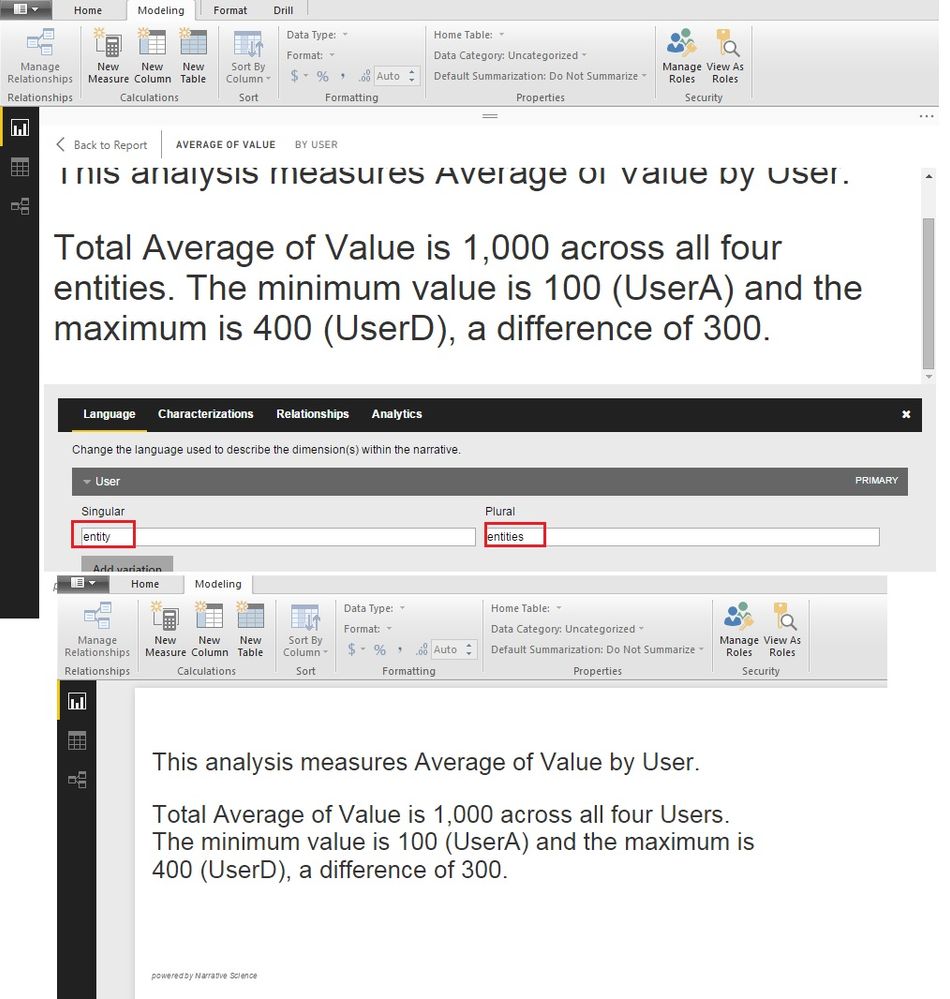
@mroomi: When you keep the cursor on the Narrative visual, there will be a gear icon. You will be able to see the "Language" tab, there you can change the wordings. 

For example; In the screenshot attached, visual word "entity" which i want to change to "user". You can edit this words, the visual will update the wordings accordingly.


Narrative Example.jpg

Helpful resources

Announcements
April Power BI Update Carousel

Power BI Monthly Update - April 2026

Check out the April 2026 Power BI update to learn about new features.

New to Fabric survey Carousel

New to Fabric Survey

If you have recently started exploring Fabric, we'd love to hear how it's going. Your feedback can help with product improvements.

Power BI DataViz World Championships carousel

Power BI DataViz World Championships - June 2026

A new Power BI DataViz World Championship is coming this June! Don't miss out on submitting your entry.

FabCon and SQLCon Highlights Carousel

FabCon &SQLCon Highlights

Experience the highlights from FabCon & SQLCon, available live and on-demand starting April 14th.