Don't miss your chance to take the Fabric Data Engineer (DP-600) exam for FREE! Find out how by watching the DP-600 session on-demand now through April 28th.
Learn moreJoin the FabCon + SQLCon recap series. Up next: Power BI, Real-Time Intelligence, IQ and AI, and Data Factory take center stage. All sessions are available on-demand after the live show. Register now
Hi,
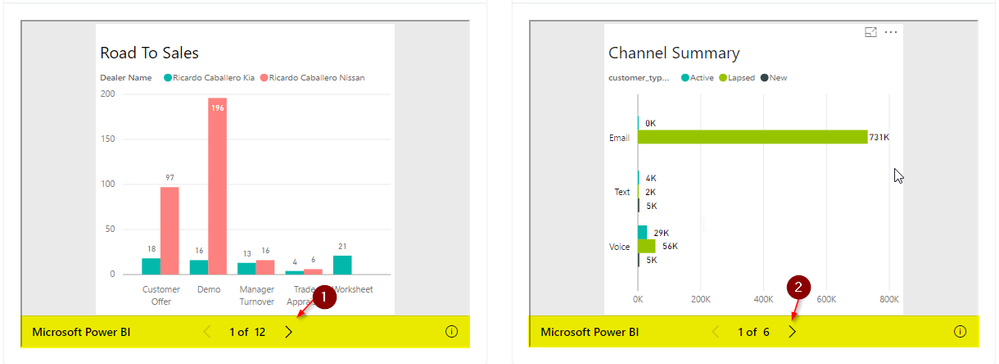
We are able to integrate power BI report using angular 2. But we are seeing a navigation area as highlighted in the below screenshot. This is allowing to navigating to other tiles in the report. We just need to hide this section to prevent navigation to other tiles. Please advise on how can we hide that section. Thank you.
Thanks,
Nagarjun B
This worked for me. I'm not a coder, so I don't understand why, and I used trial & error to get the right cropping using the numbers in "clip:rect" below, but beyond that, don't have a capacity to answer questions on this.
<div id="content">
<div style="height:580px;width:960px">
<iframe width="960" height="580" src="[URL LINK]" frameborder="0" height="100%" width="100%" style="position:absolute; clip:rect(0px,1100px,543px,0px);
bottom:-0px; allowFullScreen="true" ></iframe>
</div>
</div>
How are you embedding reports? Are you using the the Power BI REST API to retreive the report's embed URL and then embedding the report using the Power BI JavaScript API?
It looks like you have just pasted a Publish to Web URL into an iFrame and exposed a report with anonymous access.
The weird thing is you have an extra navigation element that I don't ever see when I am embedding Power BI Reports. You have the navContentPaneEnabled property set to false and that is hiding the standard gray tabbed page navigation at the bottom of a Power BI report. However, you are seeing the other type of page navigation with forward and back arrows and no page names. I have only seen that navigation element before when I have used the Publish to Web feature. I will try to do a little testing on this over the weekend to see if I can recreate the problem.
Hi Ted,
We are still seeing this issue. Did you get a chance to reproduce the issue. Any help is greatly appreciated. Thank you.
Thanks,
Nagarjun B
Check out the April 2026 Power BI update to learn about new features.
If you have recently started exploring Fabric, we'd love to hear how it's going. Your feedback can help with product improvements.
A new Power BI DataViz World Championship is coming this June! Don't miss out on submitting your entry.
| User | Count |
|---|---|
| 2 | |
| 1 | |
| 1 | |
| 1 | |
| 1 |
| User | Count |
|---|---|
| 8 | |
| 8 | |
| 4 | |
| 3 | |
| 2 |