We've captured the moments from FabCon & SQLCon that everyone is talking about, and we are bringing them to the community, live and on-demand. Starts on April 14th. Register now
Hello there,
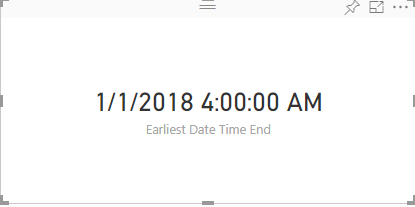
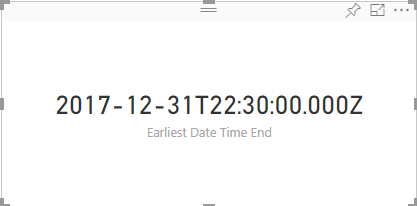
I have updated Visual API from 1.13.0 to v2.1.0 but I may have found some issue with the formatting of the date. I am using formatting utils to format the data in visual.
With v1.13.0 formatting is like below
With v2.1.0 formatting is like below
I just changed the API version by running the pbiviz update 2.1.0 command and did not do any changes in the code.
How do I fix this issue?
Additional info:
I am using following code to format date valuse suing value formatter.
dataLabelValueFormatted = this._format(
dataLabelValue,
{
"format": dataLabelFormat,
"cultureSelector": this.culture
});dataLabelFormat value is G when using Date time field.
below is package.json file.
"dependencies": {
"d3": "^3.5.17",
"powerbi-visuals-utils-dataviewutils": "^1.4.1",
"powerbi-visuals-utils-formattingutils": "^3.0.2",
"powerbi-visuals-utils-svgutils": "^1.1.0",
"powerbi-visuals-utils-tooltiputils": "^1.0.1",
"powerbi-visuals-utils-typeutils": "^1.1.0"
},
"devDependencies": {
"@types/d3": "^3.5.41",
"eslint": "^5.3.0",
"tslint": "^5.11.0",
"typescript": "^3.0.1"
}
Solved! Go to Solution.
Hi @v-viig
The reason formatting was not working for date time is because I have to pass date time object while formatting date time and not date time string. Strange thing is that with API v1.13.0 I was passing date time string and it was working fine but with API v2.1 I had to pass date time object.
I found this solution by looking at the source code of LineDotChart in visual.ts file @line 166.
Please share pbiviz.json file because it might be related to missing js files.
Ignat Vilesov,
Software Engineer
Microsoft Power BI Custom Visuals
Hi @v-viig Thanks for reply.
Below is pbiviz.json file for visual.
{
"visual": {
"name": "visual",
"displayName": "Visual",
"guid": "visual",
"visualClassName": "Visual",
"version": "1.0.0",
"description": "",
"supportUrl": "",
"gitHubUrl": ""
},
"apiVersion": "2.1.0",
"author": {
"name": "",
"email": ""
},
"assets": {
"icon": "assets/icon.png"
},
"externalJS": [
"node_modules/d3/d3.js",
"node_modules/globalize/lib/globalize.js",
"node_modules/powerbi-visuals-utils-tooltiputils/lib/index.js",
"node_modules/globalize/lib/cultures/globalize.cultures.js",
"node_modules/powerbi-visuals-utils-typeutils/lib/index.js",
"node_modules/powerbi-visuals-utils-dataviewutils/lib/index.js",
"node_modules/powerbi-visuals-utils-formattingutils/lib/index.js"
],
"style": "style/visual.less",
"capabilities": "capabilities.json",
"dependencies": "dependencies.json",
"stringResources": []
}
Hi @v-viig
The reason formatting was not working for date time is because I have to pass date time object while formatting date time and not date time string. Strange thing is that with API v1.13.0 I was passing date time string and it was working fine but with API v2.1 I had to pass date time object.
I found this solution by looking at the source code of LineDotChart in visual.ts file @line 166.
If you have recently started exploring Fabric, we'd love to hear how it's going. Your feedback can help with product improvements.
A new Power BI DataViz World Championship is coming this June! Don't miss out on submitting your entry.
Share feedback directly with Fabric product managers, participate in targeted research studies and influence the Fabric roadmap.
| User | Count |
|---|---|
| 1 | |
| 1 | |
| 1 | |
| 1 | |
| 1 |