cancel
Showing results for 
Search instead for 
Did you mean: 

The Power BI Data Visualization World Championships is back! Get ahead of the game and start preparing now! Learn more

Reply
bhavesh-jadav
Helper I
Helper I

Date formatting issue with Visual API v2.1

Hello there,


I have updated Visual API from 1.13.0 to v2.1.0 but I may have found some issue with the formatting of the date. I am using formatting utils to format the data in visual.

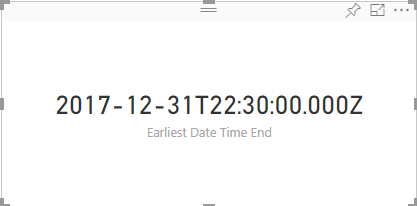
With v1.13.0 formatting is like below
 68747470733a2f2f692e696d6775722e636f6d2f6547687a62754a2e706e67.png

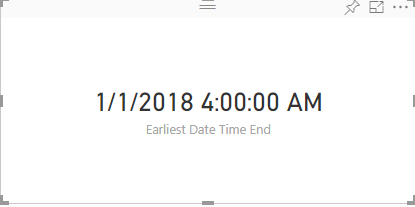
With v2.1.0 formatting is like below

68747470733a2f2f692e696d6775722e636f6d2f4d51745a5948422e706e67.png

I just changed the API version by running the pbiviz update 2.1.0 command and did not do any changes in the code.

How do I fix this issue?


Additional info:

I am using following code to format date valuse suing value formatter.

dataLabelValueFormatted = this._format(
                        dataLabelValue,
                        {
                            "format": dataLabelFormat,
                            "cultureSelector": this.culture
                        });

dataLabelFormat value is G when using Date time field.

below is package.json file.

"dependencies": {
    "d3": "^3.5.17",
    "powerbi-visuals-utils-dataviewutils": "^1.4.1",
    "powerbi-visuals-utils-formattingutils": "^3.0.2",
    "powerbi-visuals-utils-svgutils": "^1.1.0",
    "powerbi-visuals-utils-tooltiputils": "^1.0.1",
    "powerbi-visuals-utils-typeutils": "^1.1.0"
  },
  "devDependencies": {
    "@types/d3": "^3.5.41",
    "eslint": "^5.3.0",
    "tslint": "^5.11.0",
    "typescript": "^3.0.1"
  }
1 ACCEPTED SOLUTION

Hi @v-viig


The reason formatting was not working for date time is because I have to pass date time object while formatting date time and not date time string. Strange thing is that with API v1.13.0 I was passing date time string and it was working fine but with API v2.1 I had to pass date time object.

I found this solution by looking at the source code of LineDotChart in visual.ts file @line 166.

View solution in original post

3 REPLIES 3
v-viig
Community Champion
Community Champion

Please share pbiviz.json file because it might be related to missing js files.


Ignat Vilesov,

Software Engineer


Microsoft Power BI Custom Visuals

pbicvsupport@microsoft.com

Hi @v-viig Thanks for reply.


Below is pbiviz.json file for visual.


{
  "visual": {
    "name": "visual",
    "displayName": "Visual",
    "guid": "visual",
    "visualClassName": "Visual",
    "version": "1.0.0",
    "description": "",
    "supportUrl": "",
    "gitHubUrl": ""
  },
  "apiVersion": "2.1.0",
  "author": {
    "name": "",
    "email": ""
  },
  "assets": {
    "icon": "assets/icon.png"
  },
  "externalJS": [
    "node_modules/d3/d3.js",
    "node_modules/globalize/lib/globalize.js",
    "node_modules/powerbi-visuals-utils-tooltiputils/lib/index.js",
    "node_modules/globalize/lib/cultures/globalize.cultures.js",
    "node_modules/powerbi-visuals-utils-typeutils/lib/index.js",
    "node_modules/powerbi-visuals-utils-dataviewutils/lib/index.js",
    "node_modules/powerbi-visuals-utils-formattingutils/lib/index.js"
  ],
  "style": "style/visual.less",
  "capabilities": "capabilities.json",
  "dependencies": "dependencies.json",
  "stringResources": []
}

Hi @v-viig


The reason formatting was not working for date time is because I have to pass date time object while formatting date time and not date time string. Strange thing is that with API v1.13.0 I was passing date time string and it was working fine but with API v2.1 I had to pass date time object.

I found this solution by looking at the source code of LineDotChart in visual.ts file @line 166.

Helpful resources

Announcements
Power BI DataViz World Championships

Power BI Dataviz World Championships

The Power BI Data Visualization World Championships is back! Get ahead of the game and start preparing now!

December 2025 Power BI Update Carousel

Power BI Monthly Update - December 2025

Check out the December 2025 Power BI Holiday Recap!

FabCon Atlanta 2026 carousel

FabCon Atlanta 2026

Join us at FabCon Atlanta, March 16-20, for the ultimate Fabric, Power BI, AI and SQL community-led event. Save $200 with code FABCOMM.