cancel
Showing results for 
Search instead for 
Did you mean: 

Did you hear? There's a new SQL AI Developer certification (DP-800). Start preparing now and be one of the first to get certified. Register now

Reply
jugurtha
Frequent Visitor

Custom Visual in PowerBi Javascript

Hi all,


I'm working on custom visual of PowerBi Javascript and i have a problem in this part of the code below:

Capture4.PNG 

I don't know where i can find the "visualContainer", i try with the title of my visual but it's not working.

Capture5.PNG


Than you.

1 ACCEPTED SOLUTION
Anonymous
Not applicable

Hi @jugurtha 

It is a little bit frustrating, but you can get the Visual ID by opening up the pbix file.

Start by making a copy of your PBIX report file
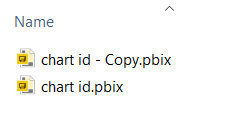
MattCalderwood_0-1596815133872.png

Then rename the pbix file extension to .zip (pbix files are simply zip archives)
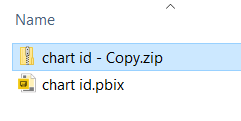
MattCalderwood_1-1596815214094.png


You can then browse the contents - open up the 'reports' folder inside - and look for a file called 'Layout'

MattCalderwood_2-1596815297093.png


You can then open this file in notepad - or another text editor...

The file contains JSON data defining your report contents and layout.

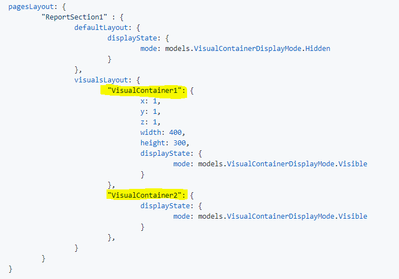
If we take the contents of the file and view it in a JSON viewer - we can see the structure.

MattCalderwood_3-1596815519403.png

The report is split into the its report pages (Sections) - and each visual is then found under the 'Visiual Containers' array - in my example here, I only have a single visual.


The Config property in this first (and only) entry - shows the internal name of your visual.  => 4babf0e10a7c5d8b6819
If you look at the remaining contents you will find the visual title - this will help you identify which visual is which.


Note: I think you will also need to supply the internal name for the report sections (ReportSection1) as shown in the JSON you posted.


An alternative Option for discovering the ID's:

If you are already embedding your report - you can use the GetVisuals function to get all visuals in a page.
https://github.com/Microsoft/PowerBI-JavaScript/wiki/Get-Visuals
The response from this method call will include the internal name/ID of each visual.

Hope this helps.
Cheers, Matt

View solution in original post

1 REPLY 1
Anonymous
Not applicable

Hi @jugurtha 

It is a little bit frustrating, but you can get the Visual ID by opening up the pbix file.

Start by making a copy of your PBIX report file

MattCalderwood_0-1596815133872.png

Then rename the pbix file extension to .zip (pbix files are simply zip archives)

MattCalderwood_1-1596815214094.png


You can then browse the contents - open up the 'reports' folder inside - and look for a file called 'Layout'

MattCalderwood_2-1596815297093.png


You can then open this file in notepad - or another text editor...

The file contains JSON data defining your report contents and layout.

If we take the contents of the file and view it in a JSON viewer - we can see the structure.

MattCalderwood_3-1596815519403.png

The report is split into the its report pages (Sections) - and each visual is then found under the 'Visiual Containers' array - in my example here, I only have a single visual.


The Config property in this first (and only) entry - shows the internal name of your visual.  => 4babf0e10a7c5d8b6819
If you look at the remaining contents you will find the visual title - this will help you identify which visual is which.


Note: I think you will also need to supply the internal name for the report sections (ReportSection1) as shown in the JSON you posted.


An alternative Option for discovering the ID's:

If you are already embedding your report - you can use the GetVisuals function to get all visuals in a page.
https://github.com/Microsoft/PowerBI-JavaScript/wiki/Get-Visuals
The response from this method call will include the internal name/ID of each visual.

Hope this helps.
Cheers, Matt
Helpful resources

Announcements
April Power BI Update Carousel

Power BI Monthly Update - April 2026

Check out the April 2026 Power BI update to learn about new features.

New to Fabric survey Carousel

New to Fabric Survey

If you have recently started exploring Fabric, we'd love to hear how it's going. Your feedback can help with product improvements.

Power BI DataViz World Championships carousel

Power BI DataViz World Championships - June 2026

A new Power BI DataViz World Championship is coming this June! Don't miss out on submitting your entry.