We've captured the moments from FabCon & SQLCon that everyone is talking about, and we are bringing them to the community, live and on-demand. Starts on April 14th. Register now
Hi, Can we change legends in Map Visualization (that uses color) with custom icon? For example: I have Map Visualization that show count of network device (router, switch, hub) in certain areas. Normally, each network device will be differentiated by color. I need to change the color legend with icon (router with router icon, etc). Thank you.
Hi @andychiar,
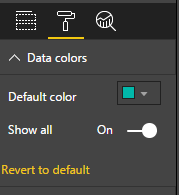
If you want to change the legends color, you can simply to modify at “Format Table” -> “Data colors”.
If you want to use custom icon as the legends, currently map visual doesn’t support this feature, you can vote this idea at below link:
Regards,
Xiaoxin Sheng
Hi Xiaoxin,
Thank you for your explanation.
I will vote the idea.
Andy
Hi
Appreciate it's years since your post - but thought I'd flag that the Icon Map now in the store should let you achieve this. Check out https://www.youtube.com/channel/UCFbxn6ALX9C4nQXD0QcJmug for examples.
James
Do you work on your own Custom Visual? So you can change the background-image from the node.
Nice Regards
Mcburn
Hi Mcburn,
No, I'm working on map visualization provided by Power BI.
I want to change data color with custom icon.
Andy
Okay so maybe a question for the Desktop Forum.
But @v-chuncz-msft or @Eric_Zhang had more Experience in that.
Nice Regards
Mcburn
Oh, I'm sorry for the wrong Forum.
Should I post a new topic in the Desktop Forum?
Andy
Iam not really sure but i think you get more help on the Desktop Forum.
But i linked you Sam and Eric. I think they know what to do :).
Sry i can not help you on your Problem. But i hope some other can do this.
Nice Regards
Mcburn
If you have recently started exploring Fabric, we'd love to hear how it's going. Your feedback can help with product improvements.
A new Power BI DataViz World Championship is coming this June! Don't miss out on submitting your entry.
| User | Count |
|---|---|
| 1 | |
| 1 | |
| 1 | |
| 1 | |
| 1 |