Join the FabCon + SQLCon recap series. Up next: Power BI, Real-Time Intelligence, IQ and AI, and Data Factory take center stage. All sessions are available on-demand after the live show. Register now
How do calculate a measure for weigthed average date?
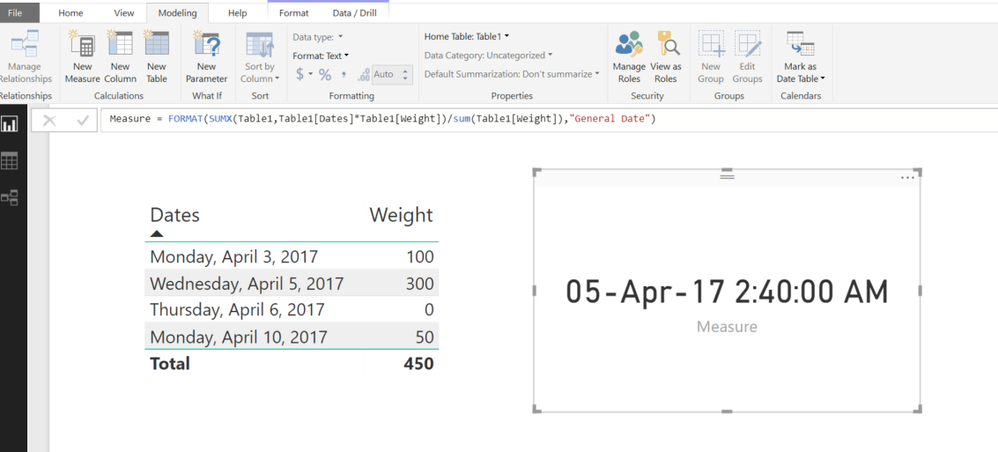
If I have a loading in 4 days:
April 3 2017: 100 kg
April 5 2017: 300kg
April 6 2017: 0 kg
April 10 2017: 50 kg
I would like a measure that provides me a weighted average of these three days by weight:
something like: Sum of dates multiply by the weights divided by total weight
When I try doing this I cannot put it in day format again
Solved! Go to Solution.
HI @Aleph18
Try this MEASURE
Measure =
FORMAT (
SUMX ( Table1, Table1[Dates] * Table1[Weight] )
/ SUM ( Table1[Weight] ),
"General Date"
)
Here are the different date formats from
https://msdn.microsoft.com/en-us/library/ee634813.aspx
| Format specification | Description |
|---|---|
"General Date" |
Displays a date and/or time. For example, 3/12/2008 11:07:31 AM. Date display is determined by your application's current culture value. |
"Long Date" or "Medium Date" |
Displays a date according to your current culture's long date format. For example, Wednesday, March 12, 2008. |
"Short Date" |
Displays a date using your current culture's short date format. For example, 3/12/2008. |
"Long Time" or |
Displays a time using your current culture's long time format; typically includes hours, minutes, seconds. For example, 11:07:31 AM. |
"Medium Time" |
Displays a time in 12 hour format. For example, 11:07 AM. |
"Short Time" |
Displays a time in 24 hour format. For example, 11:07. |
Check out the April 2026 Power BI update to learn about new features.
If you have recently started exploring Fabric, we'd love to hear how it's going. Your feedback can help with product improvements.
A new Power BI DataViz World Championship is coming this June! Don't miss out on submitting your entry.
| User | Count |
|---|---|
| 40 | |
| 39 | |
| 31 | |
| 21 | |
| 14 |
| User | Count |
|---|---|
| 67 | |
| 58 | |
| 29 | |
| 27 | |
| 25 |