Join us at FabCon Atlanta from March 16 - 20, 2026, for the ultimate Fabric, Power BI, AI and SQL community-led event. Save $200 with code FABCOMM.
Register now!The Power BI Data Visualization World Championships is back! Get ahead of the game and start preparing now! Learn more
How do calculate a measure for weigthed average date?
If I have a loading in 4 days:
April 3 2017: 100 kg
April 5 2017: 300kg
April 6 2017: 0 kg
April 10 2017: 50 kg
I would like a measure that provides me a weighted average of these three days by weight:
something like: Sum of dates multiply by the weights divided by total weight
When I try doing this I cannot put it in day format again
Solved! Go to Solution.
HI @Aleph18
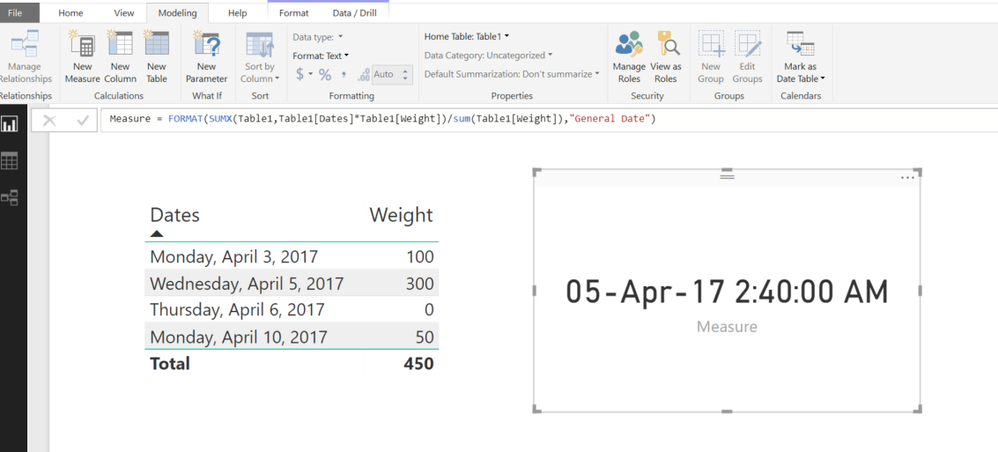
Try this MEASURE
Measure =
FORMAT (
SUMX ( Table1, Table1[Dates] * Table1[Weight] )
/ SUM ( Table1[Weight] ),
"General Date"
)
Here are the different date formats from
https://msdn.microsoft.com/en-us/library/ee634813.aspx
| Format specification | Description |
|---|---|
"General Date" |
Displays a date and/or time. For example, 3/12/2008 11:07:31 AM. Date display is determined by your application's current culture value. |
"Long Date" or "Medium Date" |
Displays a date according to your current culture's long date format. For example, Wednesday, March 12, 2008. |
"Short Date" |
Displays a date using your current culture's short date format. For example, 3/12/2008. |
"Long Time" or |
Displays a time using your current culture's long time format; typically includes hours, minutes, seconds. For example, 11:07:31 AM. |
"Medium Time" |
Displays a time in 12 hour format. For example, 11:07 AM. |
"Short Time" |
Displays a time in 24 hour format. For example, 11:07. |
The Power BI Data Visualization World Championships is back! Get ahead of the game and start preparing now!
| User | Count |
|---|---|
| 40 | |
| 37 | |
| 33 | |
| 29 | |
| 26 |
| User | Count |
|---|---|
| 134 | |
| 104 | |
| 63 | |
| 60 | |
| 55 |