Join us at FabCon Atlanta from March 16 - 20, 2026, for the ultimate Fabric, Power BI, AI and SQL community-led event. Save $200 with code FABCOMM.
Register now!Vote for your favorite vizzies from the Power BI Dataviz World Championship submissions. Vote now!
Hi there,
really struggling to find a solution for this, hope someone can help.
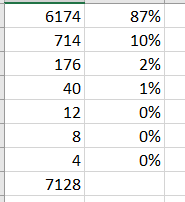
i am trying to calculate the weigted average of "vol" per item.
next to vol column i want to see something like below
LINK TO FILE - TEST- Copy.pbix
appreciate if anyone can help, thanks in advance.
best regards
timur
Solved! Go to Solution.
@timurcakin , If volume is column
Divide(Sum(Table[VOlume]), Calculate(Sum(Table[VOlume]), allselected()) )
Percent of Total and Percent of SubTotal https://www.youtube.com/watch?v=6jTildcV2ho
https://www.youtube.com/watch?v=cN8AO3_vmlY&t=24270s
Vote for your favorite vizzies from the Power BI World Championship submissions!
If you love stickers, then you will definitely want to check out our Community Sticker Challenge!
Check out the January 2026 Power BI update to learn about new features.
| User | Count |
|---|---|
| 56 | |
| 52 | |
| 45 | |
| 16 | |
| 16 |
| User | Count |
|---|---|
| 107 | |
| 105 | |
| 40 | |
| 33 | |
| 25 |