This time we’re going bigger than ever. Fabric, Power BI, SQL, AI and more. We're covering it all. You won't want to miss it.
Learn moreLevel up your Power BI skills this month - build one visual each week and tell better stories with data! Get started
Hi there,
really struggling to find a solution for this, hope someone can help.
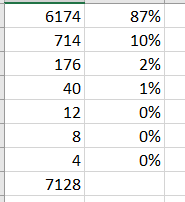
i am trying to calculate the weigted average of "vol" per item.
next to vol column i want to see something like below
LINK TO FILE - TEST- Copy.pbix
appreciate if anyone can help, thanks in advance.
best regards
timur
Solved! Go to Solution.
@timurcakin , If volume is column
Divide(Sum(Table[VOlume]), Calculate(Sum(Table[VOlume]), allselected()) )
Percent of Total and Percent of SubTotal https://www.youtube.com/watch?v=6jTildcV2ho
https://www.youtube.com/watch?v=cN8AO3_vmlY&t=24270s
Check out the April 2026 Power BI update to learn about new features.
Sign up to receive a private message when registration opens and key events begin.
If you have recently started exploring Fabric, we'd love to hear how it's going. Your feedback can help with product improvements.
| User | Count |
|---|---|
| 30 | |
| 23 | |
| 22 | |
| 16 | |
| 15 |
| User | Count |
|---|---|
| 60 | |
| 35 | |
| 28 | |
| 22 | |
| 21 |