Get certified for free when you join Fabric Data Days 2026 and dive into Fabric, Power BI, SQL, AI, and other essential data skills.
Join nowData Days is here! Join us now for 60+ days of learning, challenges, and connection. Learn more
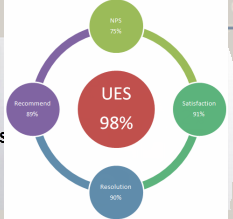
Below is the image provided by client, can someone help me out to best way to present data in Power BI, I'm looking how we can show case data and which graph is good
I have five columns (NPS,recommend,Satisfaction,UES,Resolution) and date slicer, any help much appreciated, Thanks
If the client wants that exact image, just import it without the measures as an Image. After positioning it in the report, use separate Card visuals and overlay them on top of the image in the appropriate positions.
i guess this works! but is there any graph related to image?, if possible let me know
In terms of using it in one chart, you could also load an image as the background for a scatterplot, and then create a coordinate system for your measures so that they appear as points around the circle.
Don't miss out on Data Days, June 15 through August 7. Learn Fabric, Power BI, SQL, AI and more.
Check out the May 2026 Power BI update to learn about new features.
| User | Count |
|---|---|
| 23 | |
| 23 | |
| 21 | |
| 17 | |
| 13 |
| User | Count |
|---|---|
| 58 | |
| 50 | |
| 37 | |
| 29 | |
| 24 |